Model release form: free in Word, or sign it online
Reviewed in October 2026
A model release is a signed permission from a person to use their image, voice or likeness in photos or video. Photographers, brands and producers need one to use a recognizable person in ads and marketing. It sets the uses allowed, the term and the payment.
Ten documents free, no card. Signed by the model or talent and a parent if under 18.
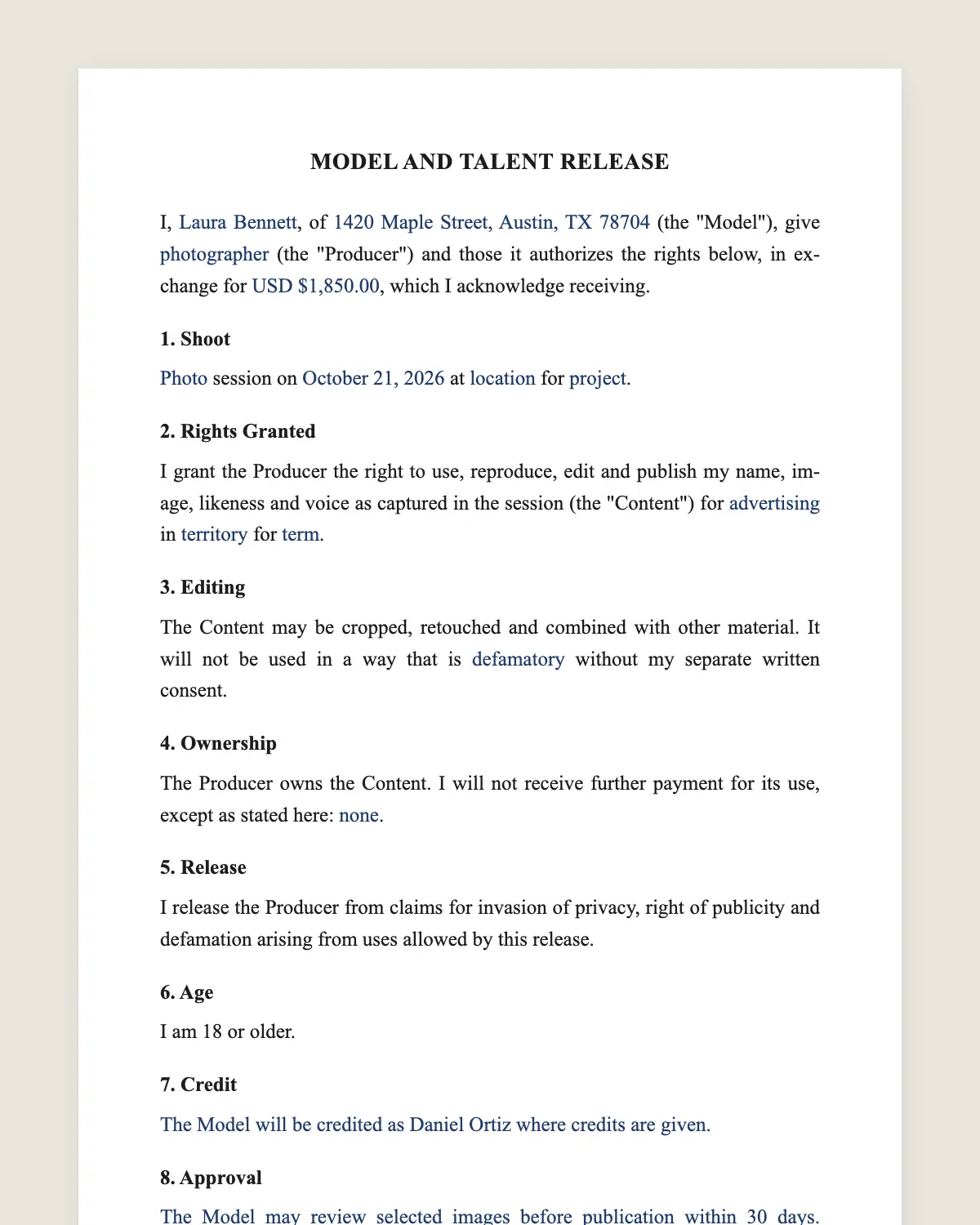
Example filled in with sample data
The full model release form
MODEL AND TALENT RELEASE
I, [model full name], of [address] (the "Model"), give [photographer or company name] (the "Producer") and those it authorizes the rights below, in exchange for [USD [amount] / copies of the images / other consideration], which I acknowledge receiving.
1. Shoot
[Photo / video / audio] session on [date] at [location] for [project or client].
2. Rights Granted
I grant the Producer the right to use, reproduce, edit and publish my name, image, likeness and voice as captured in the session (the "Content") for [advertising, marketing, social media, website, print, editorial, broadcast] in [territory] for [term / in perpetuity].
3. Editing
The Content may be cropped, retouched and combined with other material. It will not be used in a way that is [defamatory / pornographic / associated with [sensitive subjects]] without my separate written consent.
4. Ownership
The Producer owns the Content. I will not receive further payment for its use, except as stated here: [none / royalties].
5. Release
I release the Producer from claims for invasion of privacy, right of publicity and defamation arising from uses allowed by this release.
6. Age
I am 18 or older. [If under 18: the parent or guardian below consents on the Model's behalf.]
7. Credit
[The Model will be credited as [name] where credits are given. / No credit is required.]
8. Approval
[The Model may review selected images before publication within [number] days. / The Model waives approval of the final images.] Silence after the review period counts as approval.
9. Governing Law and Signatures
This release is governed by the laws of the State of [state] and may be signed electronically. A copy has the same effect as the original.
Model
Name: [name]
Signature: ______________
Date: [date]
PARENT OR GUARDIAN (if Model is under 18)
Name: [name]
Signature: ______________
Date: [date]
Producer
Name: [name]
Signature: ______________
Date: [date]
What the template includes
Model, producer and payment
Date, place and project of the shoot
Uses, media, territory and term
Editing allowed and sensitive uses
Ownership of the photos or video
Release from privacy and publicity claims
Age statement and parent signature for minors
What you fill in
Field
Example
Model
Tasha Williams
Producer
Northlight Studio LLC
Shoot
Photo session, March 8, 2027, Brooklyn, NY
Project
Spring campaign for Fern & Oak Apparel
Uses
Ads, social media, website and print
Territory and term
Worldwide, 3 years
Payment
USD 650
How it gets signed
1Choose «Use this template», fill in the fields and review the full model release form.
2Send it by WhatsApp or email. The other party opens the link on their phone without an account.
3They tap the brown bar at the bottom that says «Sign as …» and draw their signature once.
4Everyone gets the signed PDF with its signature certificate. Anyone can check it at signsolu.com/verificar.
The signing screen tells each signer that signing means agreeing to sign electronically. It links to the electronic signature disclosure that the ESIGN Act asks for.
What you get once everyone signs
The signed PDF. The final model release form with every drawn signature in place.
The signature certificate. It lists each signer and the date and time of each signature.
A record you can check. The folio on the certificate opens the document history at signsolu.com/verificar.
Reminders. Turn them on and SignSolú reminds every signer who has not signed yet.
Your first ten documents are free and need no card.
What the law says
Most states protect a person's right of publicity. Using a recognizable person to sell a product without permission can lead to claims. A signed release is the standard protection.
Editorial uses, like news, often do not need a release. Advertising and marketing almost always do.
Minors cannot give binding consent alone in most states. A parent or guardian signs for them.
The ESIGN Act, 15 U.S.C. 7001 gives an electronic signature the same legal effect as one on paper. A contract cannot be denied effect only because it was signed electronically.
Who needs a model release
Photographers selling stock photos or shooting campaigns.
Brands posting customers or employees in ads.
Video producers filming interviews and testimonials.
Influencers featuring other people in sponsored posts.
Event organizers using attendee photos in promotions.
Model release or photo release
A model release covers a person. A property release covers a private building, artwork or product shown in the image.
Stock agencies ask for both when a recognizable person and private property appear.
Getting releases signed on set
Paper releases get lost between shoot day and editing. Send the link to each model before or during the shoot.
Each model signs from the phone. The signed PDF goes to your project folder with the date and time.
For minors, add the parent as a signer. Both signatures arrive in the same document.
Common mistakes
Too narrow a use. A release for «social media» may not cover a billboard. List every medium.
No parent signature for minors. The release may not hold.
Sensitive uses without warning. Health, politics or personal topics need clear consent.
No payment stated. Even a small fee or free photos should be written. It shows the release was given for something.
Releases for customers and employees
Brands often feature real customers or staff in posts and ads. They need a release just like a hired model.
For employees, sign the release separately from the job contract. It should be voluntary, and the employee should be able to say no without consequences.
If an employee leaves, the release decides whether you can keep using the photos. Set the term in clause 2.
Organizing releases for a big shoot
1Make one filled release per model before shoot day.
2Send each model their link with the call sheet.
3Check that every release is signed before the first frame.
4Name each signed PDF with the model and the project.
5Keep the releases with the final images, so the client receives both.
Stock agencies and clients ask for releases when they license an image. A complete folder saves a week of chasing models later.
For events with many people in frame, post a clear notice and get releases from anyone featured prominently.
Paying the model and keeping records
Pay the fee in clause 2 the same day or as agreed, and keep the receipt with the release. Payment and release together close the deal.
For large campaigns, attach a usage schedule that lists each medium and date range. Clients extend usage later, and a clear schedule makes the new fee easy to agree.
Before you sign
Read every clause of the model release form with the other party before anyone signs. Change what does not fit your deal.