Medical consent form: free in Word, or sign it online
Reviewed in October 2026
A medical consent form for a minor lets a parent authorize another adult to consent to medical care for their child. Grandparents, babysitters, coaches and schools use it when the parents are away. It lists the child, the caregiver, the dates, the insurance and any allergies or medications.
Ten documents free, no card. Signed by the parent or legal guardian.
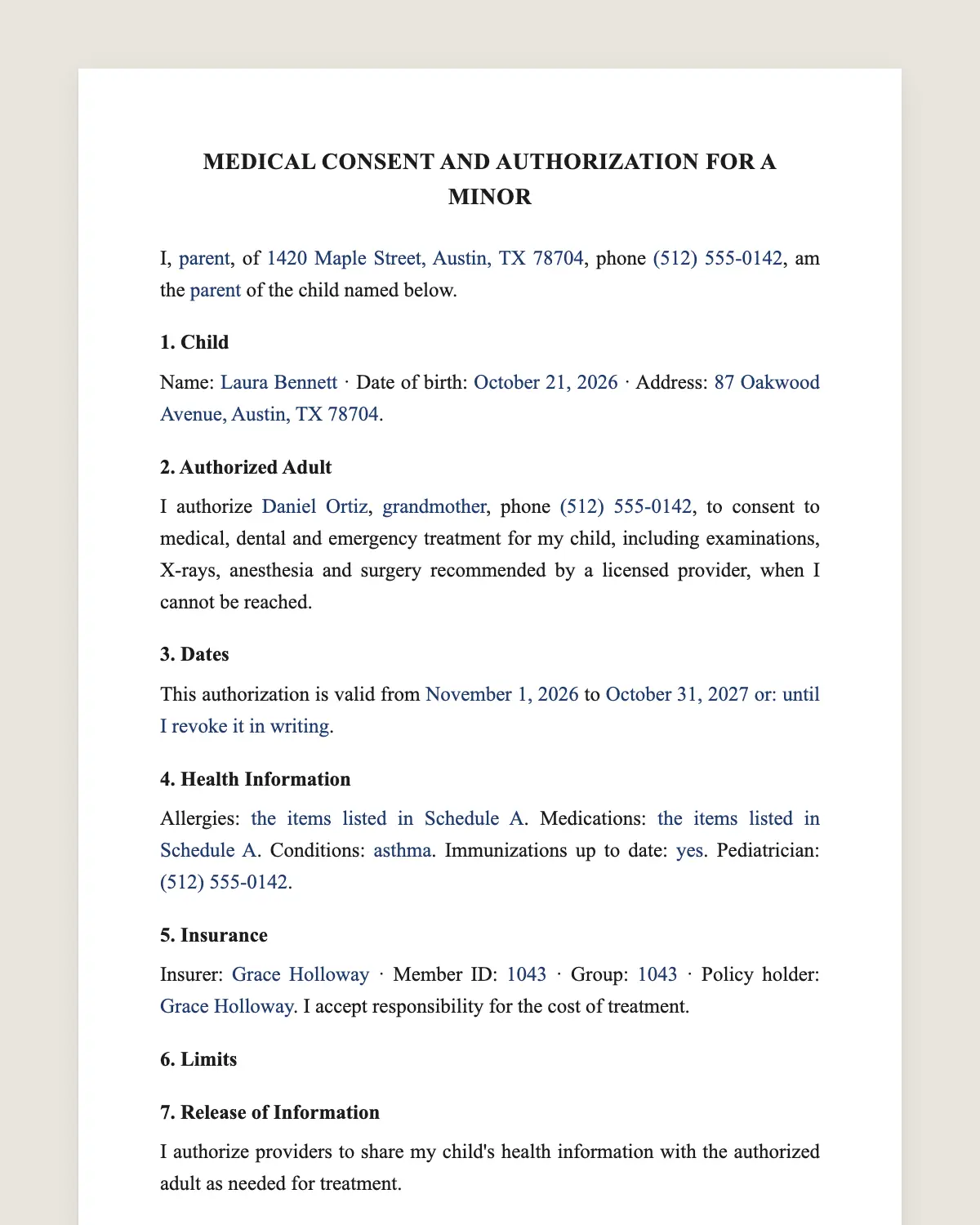
Example filled in with sample data
The full medical consent form
MEDICAL CONSENT AND AUTHORIZATION FOR A MINOR
I, [parent or guardian full name], of [address], phone [phone], am the [parent / legal guardian] of the child named below.
1. Child
Name: [child full name] · Date of birth: [date] · Address: [address].
2. Authorized Adult
I authorize [caregiver full name], [relationship, for example grandmother, nanny, coach], phone [phone], to consent to medical, dental and emergency treatment for my child, including examinations, X-rays, anesthesia and surgery recommended by a licensed provider, when I cannot be reached.
3. Dates
This authorization is valid from [start date] to [end date] [or: until I revoke it in writing].
4. Health Information
Allergies: [list or "none known"]. Medications: [list and doses]. Conditions: [asthma, diabetes, other]. Immunizations up to date: [yes/no]. Pediatrician: [name and phone].
5. Insurance
Insurer: [name] · Member ID: [number] · Group: [number] · Policy holder: [name]. I accept responsibility for the cost of treatment.
6. Limits
[Optional: This authorization does not cover [elective procedures / specific treatments]. The authorized adult must call me before [list].]
7. Release of Information
I authorize providers to share my child's health information with the authorized adult as needed for treatment.
8. Other Parent or Guardian
[Second parent name and phone, if any.] Providers may contact either parent at any time.
9. Contact While Away
I can be reached at [phone], [email] and [backup contact name and phone]. The authorized adult will try to reach me before any non-emergency treatment and will tell me about any treatment as soon as possible.
10. Revocation
I may revoke this authorization at any time by telling the authorized adult and any provider in writing. A copy of this form, including an electronic copy, is as valid as the original.
Parent or guardian
Name: [name]
Signature: ______________
Date: [date]
SECOND PARENT (optional)
Name: [name]
Signature: ______________
Date: [date]
What the template includes
Parent or guardian and contact details
Child's name and date of birth
The adult authorized to consent
Treatments covered, including emergencies
Start and end dates
Allergies, medications and conditions
Insurance details and payment responsibility
Optional limits
Release of health information to the caregiver
Second parent contact
What you fill in
Field
Example
Parent
Laura Chen
Child
Owen Chen, born March 14, 2017
Authorized adult
Margaret Chen, grandmother
Dates
December 20, 2026 to January 4, 2027
Allergies
Penicillin
Medications
Albuterol inhaler as needed
Insurer
Blue Cross, member ID XHC123456789
Pediatrician
Dr. Patel, 555 201 3344
How it gets signed
1Choose «Use this template», fill in the fields and review the full medical consent form.
2Send it by WhatsApp or email. The other party opens the link on their phone without an account.
3They tap the brown bar at the bottom that says «Sign as …» and draw their signature once.
4Everyone gets the signed PDF with its signature certificate. Anyone can check it at signsolu.com/verificar.
The signing screen tells each signer that signing means agreeing to sign electronically. It links to the electronic signature disclosure that the ESIGN Act asks for.
What you get once everyone signs
The signed PDF. The final medical consent form with every drawn signature in place.
The signature certificate. It lists each signer and the date and time of each signature.
A record you can check. The folio on the certificate opens the document history at signsolu.com/verificar.
Reminders. Turn them on and SignSolú reminds every signer who has not signed yet.
Your first ten documents are free and need no card.
What the law says
Parents generally consent to medical care for their minor children. A written authorization lets them delegate that consent to another adult for a period.
In an emergency, providers can treat a child to save life or prevent serious harm even without consent. The form helps with everything short of that, from a sprained ankle to stitches.
Some states have their own form or rules on how long a delegation can last. Many hospitals accept any clear written consent that includes the details above.
The ESIGN Act, 15 U.S.C. 7001 gives an electronic signature the same legal effect as one on paper. A contract cannot be denied effect only because it was signed electronically.
When you need a medical consent form
Grandparents caring for the child during a trip.
Nannies and babysitters while parents work or travel.
Schools, camps and sports teams during activities and trips.
Relatives taking the child on vacation.
Divorced parents who want the other household to have the details at hand.
For grandparents
Grandparents do not have automatic authority to consent to their grandchild's care. The form gives it for the dates you set.
Send the signed PDF to the grandparent's phone. They can show it at the clinic without searching for a paper copy.
Include a copy of the insurance card. Clinics ask for it first.
Signing it before a trip
Fill in the form, sign it from your phone and send the link to the second parent if they sign too.
The caregiver receives the signed PDF with the date and time of each signature. Clinics can verify it at the link on the certificate.
Sign a new form for each trip, or set an end date far enough ahead for a school year.
Common mistakes
No allergies listed. The caregiver may not know them by heart. Write every allergy and medication.
Expired dates. A form that ended last summer may be refused.
Missing insurance details. Bring the member ID and group number.
Only a paper copy. Paper stays in a drawer at home. A PDF on the caregiver's phone travels with the child.
What to give the caregiver with the form
1A copy of the insurance card, front and back.
2The pediatrician's name, phone and after-hours line.
3A list of medications with doses and times.
4Your travel itinerary and the best way to reach you.
5The nearest urgent care and hospital to where the child will stay.
Put all of it in one message with the signed PDF. In an urgent moment, the caregiver should not have to search.
School trips, camps and sports
Schools and camps often have their own medical form. Fill in theirs when they require it, and keep this one for relatives and sitters.
Coaches traveling with a team may ask every family for a consent. Sending it as a link gets every signature back before the bus leaves.
For long programs, set the end date to the last day of the season. Sign a new one each year, since medications and allergies change.
Divorced or separated parents can each sign a form for the other household's caregivers. Check that it fits your custody order first.
Before you sign
Read every clause of the medical consent form with the other party before anyone signs. Change what does not fit your deal.