Bulk send for signature: when it is the right tool, and when it is not
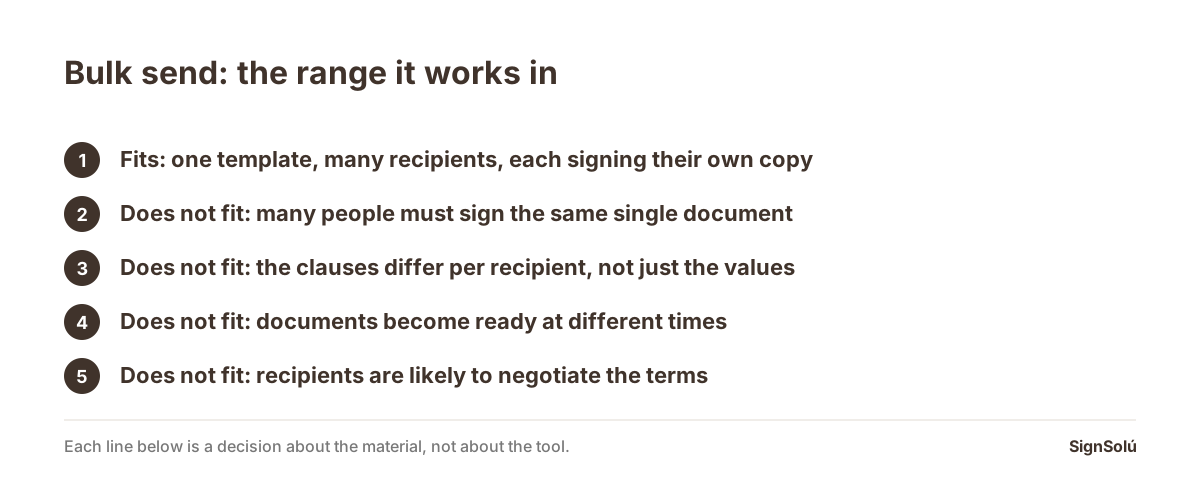
Bulk send is for one template going to many people, where each recipient gets their own separate document to sign alone. It fits when the text is identical except for merge fields, when nobody needs to negotiate anything and when each person signs their own copy. It is the wrong tool in three cases: when all those people need to sign the same single document, when the terms genuinely differ per recipient rather than just the values, and when you need the documents to go out as each one becomes ready rather than all at once. Getting that distinction right first saves most of the trouble people blame on the feature.
Bulk send goes by different names in different tools, but it always means the same thing: you take one template, attach a list of recipients, and the system produces one document per row and sends each to its own person. It is genuinely useful and it is also narrow, and almost all of the frustration around it comes from one step outside its range. This is where the edges are.
The distinction that decides everything
There are two things people mean by "send this to a hundred people", and they are opposites.
| What you want | What it is called | What comes back |
|---|---|---|
| Each person signs their own copy | Bulk send | A hundred separate signed documents |
| Everyone signs the same page | Multiple signers on one document | One signed document with a hundred signatures |
| Each person signs their own, in a fixed order | Bulk send plus signing order within each | A hundred documents, each internally sequenced |
| A group signs the same page at a counter | In-person signing on one device | One document, signed there and then |
An employee handbook acknowledgement, a policy sign-off, an annual renewal, a consent form: each person signs their own, so bulk send. A partnership agreement among five founders, a board consent, a settlement between two parties: one document, many signatures, so not bulk send. The in-person case is covered separately in in-person signing: how two people sign on one tablet.
What the spreadsheet has to carry
Most lists arrive with the columns the document needs and none of the columns the sending needs. They are different sets, and the second one is short.
- A delivery address per row, email or mobile number. Without it the row cannot go anywhere, and a missing one should be reported before the batch runs rather than halfway through it.
- Your own reference per row, such as an employee number or a case number. This is what lets you reconcile the returns without matching on names, and what stops the same row going out twice if the batch has to be re-run.
- A signing order, if a document has more than one signer inside it. Bulk send and signing order are not alternatives; they compose.
- A grouping column, such as site or department, if you will want the report split that way later. Adding it afterwards means re-reading a hundred documents.
The reference column is the one people leave out and the one that pays for itself the first time something goes wrong mid-batch. The practical version of this, for a sender working from a spreadsheet, is worked through in Spanish in contratos masivos desde Excel (in Spanish).
The three cases where it is the wrong tool
When the terms differ, not just the values
Bulk send fills fields. It does not add or remove clauses. If half your recipients need an extra schedule, or a different liability cap, you do not have one template with a hundred rows: you have two or three templates, and pretending otherwise produces documents that say the wrong thing with the right name on top. Split the list, or generate the documents properly in your own system and send them through an interface rather than a spreadsheet.
When the documents become ready at different times
A batch is a moment. If the underlying work finishes continuously — a new hire every few days, an approval here and there — then batching means every document waits for the slowest one in its group, and the signing all lands at once at the worst possible time. The better pattern is to send each as it becomes ready, which is a job for an interface rather than a list.
When somebody is going to want to negotiate
Bulk send assumes the answer is yes. For an acknowledgement or a renewal that is usually true. For anything where a recipient may reasonably come back with changes, a batch of a hundred creates a hundred conversations with no thread to hold them, and the tool gives you no way to handle the redline. That is not a flaw in the feature; it is the feature working as designed on the wrong material.
What a good batch does when something goes wrong
In any list of a few hundred rows there will be a bad address, a blank value and a duplicate. What separates a usable bulk send from a painful one is what it does about them.
- 1Validates the whole list before sending anything, and gives you the problem rows as a list rather than stopping at the first one.
- 2Sends the good rows anyway, so four bad rows do not hold up two hundred and ninety-six good ones.
- 3Recognises a repeated row by your reference, so re-running a half-finished batch does not create second copies.
- 4Gives you a result file with a status per row, keyed on your reference, which becomes your reconciliation.
- 5Reports delivery honestly: sent is not delivered, and delivered is not read.
That last point causes more confusion than the rest combined, because a dashboard showing "sent" answers a question nobody asked. What the mail service can actually tell you — accepted, delivered, bounced, and why "read" is not a reliable state anywhere — is set out in Spanish in how your system knows the signing email arrived (in Spanish).
Two habits that make batches boring, which is the goal
Run ten rows first, from a phone
A ten-row test aimed at your own team costs nothing and surfaces, in a few minutes, almost everything a full batch would surface over a week: a merge field that renders as a gap, a template that is unreadable on a small screen, a subject line that reads like spam. Open one of the ten on an actual phone rather than a desktop preview, because that is where the recipients will open theirs.
Decide the follow-up before you send, not after
A batch of two hundred produces a tail of forty who have not signed, and that tail is the real work. Agree in advance what happens at day two and day five, and through which channel, so the chasing is a scheduled step rather than somebody improvising with a spreadsheet at the end of the month.
Each document in the batch still has to stand alone
The risk of volume is that the evidence thins out: it is easy to end up with two hundred PDFs and no way to show, for any one of them, who signed and when. Whatever tool you use, check this on a test batch before a real one, because it is the part you cannot reconstruct afterwards.
With SignSolú every document in a batch comes back with its own audit certificate carrying the time, IP address, device and the SHA-256 hash of the file, plus an international timestamp following the RFC 3161 standard, and anyone can check any one of them at the verification page without an account. The recipient opens the link from their phone, signs, and never creates an account or pays anything, which matters a great deal at a hundred recipients. A document counts once however many people sign it, and the interface is included in the paid plan rather than priced separately — the comparison of the billing models is in e-signature API pricing, and the product view is at the e-signature API page and in the developer guide.
If your recipients are in Mexico, the signing link also goes out over WhatsApp, which is where those recipients actually read, and what Mexican law asks of the signature is set out in is an electronic signature valid in Mexico. You can create a free account and run a ten-row test batch before committing to anything.
Frequently asked questions
What is the difference between bulk send and multiple signers?
Bulk send produces one separate document per recipient, each signed alone. Multiple signers means one single document that several people sign. Choosing the wrong one is the most common reason a bulk send appears not to work, because the output is not what the sender expected.
Can a bulk send have more than one signer per document?
Yes, and the two ideas compose rather than compete. Each row produces its own document, and inside that document you can have several signers in a set order, such as an employee and a manager. The spreadsheet then needs a column for each signer.
What should the spreadsheet contain beyond the merge fields?
A delivery address per row, your own reference per row, a signing order where a document has several signers, and a grouping column such as site or department if you will want to split the report later. The reference is the one most often missing and the one that prevents duplicates.
When is bulk send the wrong tool?
When the clauses themselves differ by recipient rather than just the values, when documents become ready at different times so batching makes everything wait, and when recipients are likely to negotiate, since a batch gives you no way to handle a redline.
Does each document in the batch keep its own evidence?
It should, and it is worth verifying on a test batch. With SignSolú each document comes back with its own audit certificate carrying the time, IP address, device and the SHA-256 hash of the file, and any one of them can be checked at the verification page without an account.
Send your next contract to Mexico for signature
Create a free account and send 10 documents with no card. Your dashboard works in English. You set the language per signer, and their email, WhatsApp message and signing page arrive in that language.