In-person signing: what it means and how two people sign on one tablet
In-person signing, sometimes called host signing, is when the signer signs on a device the sender controls while they are standing there: the tablet at the counter, the laptop at reception. It is a workflow, not a weaker signature. Under ESIGN an electronic signature is any sound, symbol or process attached to or logically associated with a record and executed or adopted by a person with the intent to sign it, and UETA attributes a record or signature to a person if it was the act of that person, shown in any manner. Neither one asks for a separate device per signer. What carries the weight is the authentication each signer went through, so the rule in a shop or clinic is one email or phone number per signer, one code per signer, one timestamped record per signer.
The term shows up in two places: in a software feature list, and in a question someone asks after the fact. The feature means the signer signs on your device while you watch. The question is whether a contract signed that way holds up when two different customers used the same tablet twenty minutes apart. It does, and the reason is worth knowing, because it is the same reason that decides every hard e-signature case.
What in-person signing actually is
In-person signing, or host signing, is the opposite of the usual remote flow. Instead of emailing a link and waiting, the sender opens the document on their own device and hands it over. The signer reads it, signs, and gives the device back. Nothing is printed and nothing is emailed back and forth.
It exists because a lot of business happens at a counter and not over email. A rental desk handing over keys. A clinic taking a consent form before a procedure, where there is no single federal form to copy: HIPAA compliance form, there is no single one. A gym signing up a member. A dealership closing a sale with a buyer who came in person. In all four, the document has to be signed in the next two minutes, and the signer does not want to install anything or create an account.
What it is not
- It is not a notarisation, and it is not witnessing. A witness requirement is separate and some documents still have one: see the witness most separation agreement templates forget.
- It is not a weaker class of signature. There is no tier in ESIGN that depends on whose device was used.
- It is not the same as signing for someone else. If you type a name on behalf of another person, that is agency, and it needs authority behind it.
- It is not a way around a document that the law requires to be executed as a deed: see supplier agreements, e-signature and the deed question.
What the statutes attribute a signature to
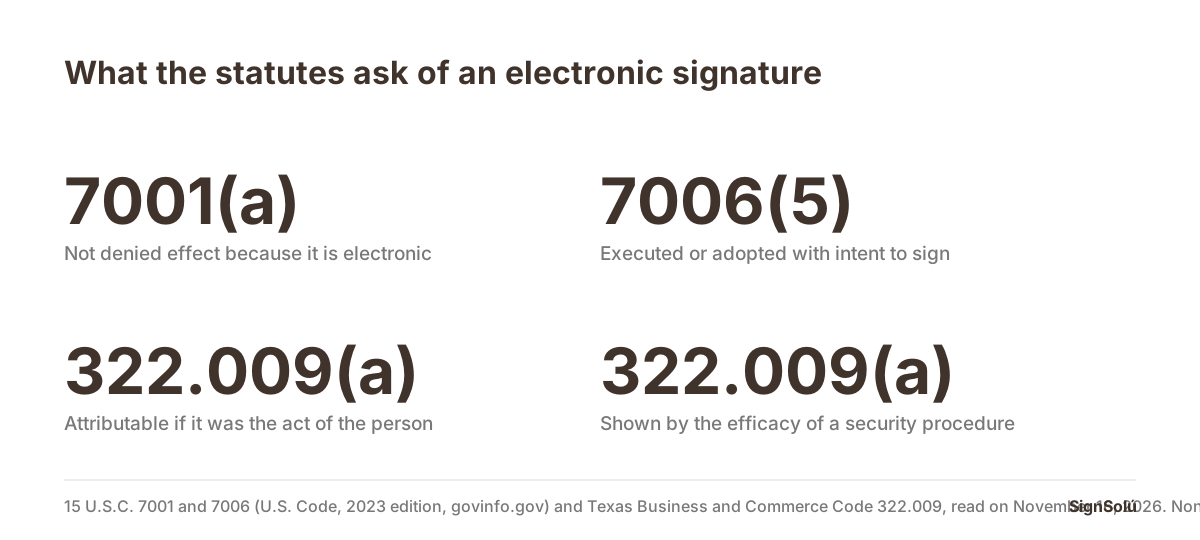
Start with the federal rule. Section 7001(a) of the Electronic Signatures in Global and National Commerce Act, read today in the 2023 edition of the U.S. Code, says that with respect to any transaction in or affecting interstate or foreign commerce a signature, contract or other record «may not be denied legal effect, validity, or enforceability solely because it is in electronic form».
Then the definition, in section 7006(5): an electronic signature is «an electronic sound, symbol, or process, attached to or logically associated with a contract or other record and executed or adopted by a person with the intent to sign the record». Read it again looking for the word device. It is not there. What the definition asks for is intent, and intent is a fact you prove with a record.
The attribution rule, where the real answer lives
ESIGN sets the floor; the detail lives in state law, in the Uniform Electronic Transactions Act, and its attribution section is the one that answers this question. Texas codified it at section 322.009 of the Business and Commerce Code, read today on the Texas Legislature site: «An electronic record or electronic signature is attributable to a person if it was the act of the person. The act of the person may be shown in any manner, including a showing of the efficacy of any security procedure applied to determine the person to which the electronic record or electronic signature was attributable.»
Subsection (b) adds that the effect of a signature attributed that way «is determined from the context and surrounding circumstances at the time of its creation, execution, or adoption, including the parties agreement, if any». So the question a court asks is not which tablet was used. It is whether the act was that person, and what security procedure stands behind that conclusion. Sharing hardware does not break the chain. Sharing an identity does.
What actually weakens an in-person signature
The risk at a counter is never the hardware. It is the shortcut the hardware invites: skipping each person details because they are standing right there. When that happens, the shared device stops being a detail and becomes the only fact in the file.
| The shortcut | Why it hurts later | What to do instead |
|---|---|---|
| One shop email address for every signer | Nobody can show who read the confirmation code | One email or phone number per signer, even in person |
| One session left open between customers | Two signatures land in the same authenticated context | Close and start a new document for each signer |
| No record of what the signer was shown | Intent to sign has to be inferred instead of proven | Keep the acceptance text each signer actually saw |
| A staff member signing for the customer | That is agency, and it needs authority behind it | The customer signs; staff only hands over the device |
| A scanned image of a signature reused | The same mark on two documents proves nothing about either | A drawn signature captured at the moment of signing |
How two people sign on one tablet, step by step
- 1Prepare the document once from a template, with the fields that change between customers. Not a fresh file each time. If the file you start from is a PDF someone emailed you, sign a PDF is the shorter route.
- 2Add each signer with their own email or phone number, in the order they will sign. This is the step people skip, and it is the one that does the work.
- 3Turn on an email code for each signer, so each one confirms a code that reached them and not the person next to them.
- 4Hand the device to the first signer. They read, they confirm their code, they draw their signature, and the time, device and IP address are recorded against their name.
- 5Close the document before the next customer. Do not pass an open session along.
- 6Repeat for the second signer, with their own email, their own code and their own record.
- 7Check the audit certificate at the end of the day, not a year later. If something looks wrong, you find it while you still remember the customer.
With SignSolú the same document can go out to several signers in one send, and the sender chooses the language of each signer: a signer who reads English gets the email, the WhatsApp message and the signing page in English, even though the sender dashboard is in Spanish. There is also a group link with a per-person code, which is what a shop uses when four people have to sign the same form at the counter without queueing at one screen. You can try it on the free plan, which is 10 documents with no card and no expiry date, from the sign-up page; the full plan is on the pricing page.
What is left in the file afterwards
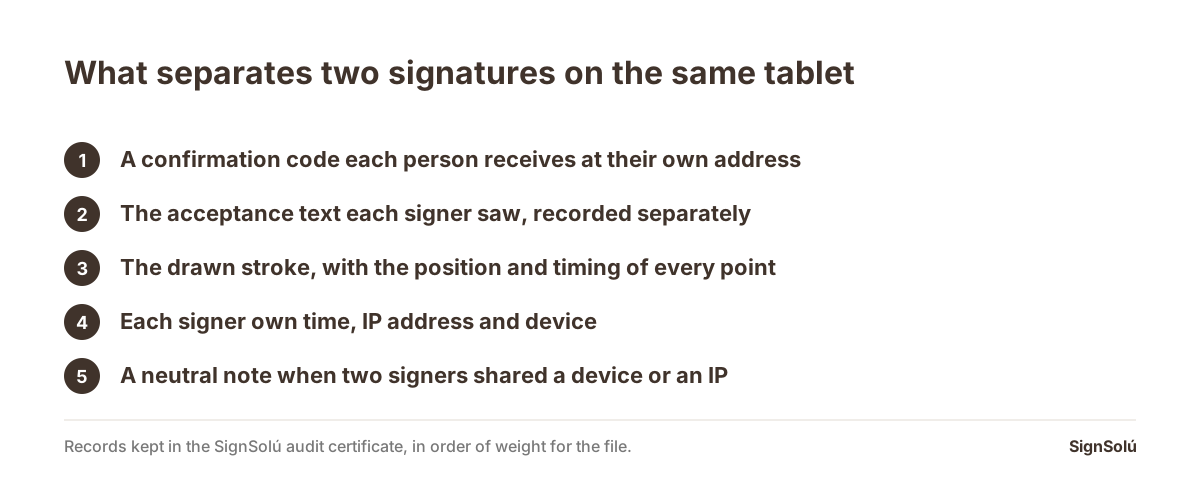
An in-person signature is worth exactly what its record is worth. What SignSolú keeps with every signature is set out on the trust page; the pieces that matter here, and that a shared tablet does not take away, are these:
- An audit certificate per signer, with the time, IP address, device and a SHA-256 hash of the document.
- The recorded stroke of a drawn signature: every point with its position and its timing, so the speed, rhythm and order of the strokes are preserved, not just the picture of the mark.
- The delivery record: which channel the link went out on, the masked destination, the acceptance text the signer saw, and whether they confirmed an email code.
- Email evidence: for each message in the flow, the hash of its content and what the mail service reported back, sent, delivered or bounced.
- An RFC 3161 timestamp on every signed document, which is the international standard and works outside Mexico.
- A case file in one click: a ZIP with the original and signed document, the certificate, every piece of evidence with its hash, an index of records, a guide for an expert witness and instructions to check all of it without depending on SignSolú.
- Public verification at /en/verify, where anyone can check a signed document without an account.
A neutral line in the certificate also notes when two signers used the same IP address or the same device, or the same address as the sender. In a shop that is expected and the explanation is obvious. What you do not want is for that fact to show up for the first time in a dispute, described by the other side.
Where to go next
- If you are deciding whether an e-signature binds at all in your country: is an electronic signature legally binding, and where.
- If the counterparty is in Mexico: is an electronic signature valid in Mexico and how to sign a contract remotely with someone in Mexico.
- If what you hand over at the counter is a waiver: signed waiver meaning, and what a waiver can never cover.
- If you are comparing what a platform charges for this: e-signature billed per user or per document.
- If the documents are generated by your own system and the counter only collects the signature: the e-signature API.
- If you just need to sign one document today: sign documents online, or sign a PDF if that is the file you have.
- If you want to check a signed PDF that someone sent you: online signature verification for a PDF.
- If your counterparty is Mexican and you are choosing a platform: e-signature platforms for doing business in Mexico, and whether a Mexican signature travels: is a Mexican e-signature valid in the US.
SignSolú is the right fit for counter work: the signer never opens an account and never pays, the link reaches them by WhatsApp from your own number or by email, several people can sign on the same tablet with their own code and their own record, every signed document carries an RFC 3161 timestamp and an audit certificate, anyone can verify it at /en/verify without signing in, and the free plan is 10 documents with no expiry and no card.
Frequently asked questions
What does in-person signing mean?
It means the signer signs on a device the sender controls, while they are present: the tablet at a counter or the laptop at reception. Some platforms call it host signing. It is a workflow for signing face to face, not a different legal class of signature.
Is a contract still valid if two customers signed on the same tablet?
Yes. ESIGN defines an electronic signature as a sound, symbol or process executed or adopted by a person with the intent to sign the record, and UETA attributes a record or signature to a person if it was the act of that person, shown in any manner. Neither requires a separate device per signer.
What proves it was that person and not the one before them?
The security procedure each signer went through. Texas Business and Commerce Code 322.009 says the act of the person may be shown in any manner, including a showing of the efficacy of any security procedure applied. In practice that means one email or phone number per signer and one confirmation code per signer.
Does the same IP address on two signatures cause a problem?
Not on its own, and in a shop it is expected, because every device goes out through the same connection. SignSolú notes it in the audit certificate in neutral wording, never blocks the signature and makes no claim about anyone conduct.
Can a staff member sign for the customer to save time?
That is a different thing: signing on behalf of someone needs authority behind it, and without it the signature is not attributable to the customer. Staff can hand over the device and explain the document; the customer signs it.
What can I download if someone later denies signing?
A case file in one click: a ZIP with the original and the signed document, the audit certificate, every piece of evidence with its hash, an index of records, a guide for an expert witness and instructions to verify everything without depending on SignSolú.
Send your next contract to Mexico for signature
Create a free account and send 10 documents with no card. Your dashboard works in English. You set the language per signer, and their email, WhatsApp message and signing page arrive in that language.