Lien waiver template: free in Word, or sign it online
Reviewed in October 2026
A lien waiver is a signed statement where a contractor or supplier gives up its right to file a lien for a payment. A conditional waiver takes effect only when the payment clears. An unconditional waiver takes effect when signed, so sign it only after the money arrives.
Ten documents free, no card. Signed by the contractor or supplier who receives the payment.
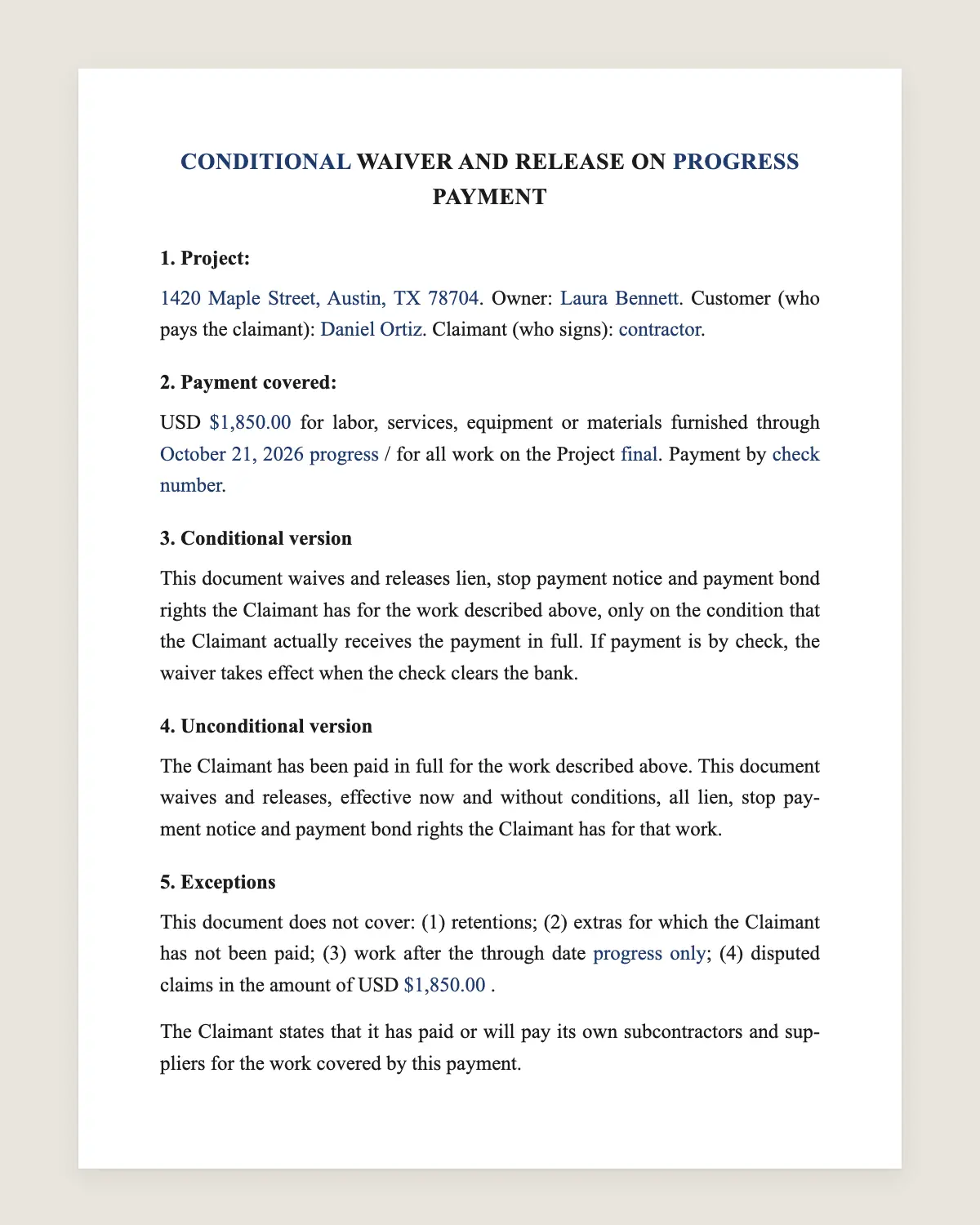
Example filled in with sample data
The full lien waiver
[CONDITIONAL / UNCONDITIONAL] WAIVER AND RELEASE ON [PROGRESS / FINAL] PAYMENT
1. Project:
[project name and address]. Owner: [owner name]. Customer (who pays the claimant): [name]. Claimant (who signs): [contractor or supplier name].
2. Payment covered:
USD [amount] for labor, services, equipment or materials furnished through [through date] [progress] / for all work on the Project [final]. Payment by [check number / wire reference].
3. Conditional version
This document waives and releases lien, stop payment notice and payment bond rights the Claimant has for the work described above, only on the condition that the Claimant actually receives the payment in full. If payment is by check, the waiver takes effect when the check clears the bank.
4. Unconditional version
The Claimant has been paid in full for the work described above. This document waives and releases, effective now and without conditions, all lien, stop payment notice and payment bond rights the Claimant has for that work.
5. Exceptions
This document does not cover: (1) retentions; (2) extras for which the Claimant has not been paid; (3) work after the through date [progress only]; (4) disputed claims in the amount of USD [amount] [if any].
The Claimant states that it has paid or will pay its own subcontractors and suppliers for the work covered by this payment.
Claimant
Name: [company name]
By: [name, title]
Signature: ______________
Date: [date]
What the template includes
Choice of conditional or unconditional
Choice of progress or final payment
Project, owner, customer and claimant
Amount, through date and payment reference
Release of lien, stop notice and bond rights
Exceptions for retention, extras and disputes
Statement that lower-tier parties are paid
What you fill in
Field
Example
Type
Conditional, progress payment
Project
Oak Ridge Medical Office, 900 Pine Ave, Phoenix, AZ
Owner
Oak Ridge Holdings LLC
Customer
Sandoval General Contractors Inc.
Claimant
Bright Spark Electric LLC
Amount
USD 42,350
Through date
October 31, 2026
Payment reference
Check 10482
How it gets signed
1Choose «Use this template», fill in the fields and review the full lien waiver.
2Send it by WhatsApp or email. The other party opens the link on their phone without an account.
3They tap the brown bar at the bottom that says «Sign as …» and draw their signature once.
4Everyone gets the signed PDF with its signature certificate. Anyone can check it at signsolu.com/verificar.
The signing screen tells each signer that signing means agreeing to sign electronically. It links to the electronic signature disclosure that the ESIGN Act asks for.
What you get once everyone signs
The signed PDF. The final lien waiver with every drawn signature in place.
The signature certificate. It lists each signer and the date and time of each signature.
A record you can check. The folio on the certificate opens the document history at signsolu.com/verificar.
Reminders. Turn them on and SignSolú reminds every signer who has not signed yet.
Your first ten documents are free and need no card.
What the law says
Mechanics lien laws are state laws. Each state decides who can file a lien, the deadlines and how a lien is waived.
Some states require their own statutory waiver forms, word for word. California and Texas are well-known examples. In those states, paste the official wording into this template before you send it.
Most other states accept any clear written waiver. Conditional waivers protect the contractor, because the release depends on the money arriving.
The ESIGN Act, 15 U.S.C. 7001 gives an electronic signature the same legal effect as one on paper. A contract cannot be denied effect only because it was signed electronically.
The four types of lien waivers
Type
When to sign it
Risk for the signer
Conditional, progress
Before a progress payment arrives
Low
Unconditional, progress
After a progress payment clears
Medium
Conditional, final
Before the final payment arrives
Low
Unconditional, final
After the final payment clears
High
Progress waivers cover work up to a date. Final waivers cover the whole job and end your lien rights on that project.
How the swap of waiver and payment works
1The contractor sends a conditional waiver with its invoice.
2The owner or general contractor pays.
3When the payment clears, the contractor sends the unconditional waiver for that same amount.
4At the end of the job, the same two steps happen with final waivers.
Lenders and title companies often require these waivers before releasing the next draw. Missing waivers hold up everyone's money.
Common mistakes
Signing unconditional before being paid. If the check bounces, the lien right is already gone.
Wrong through date. A later through date waives work you have not been paid for.
Forgetting retention and extras. List them as exceptions, or the waiver may cover them.
Waiving future rights. Many states void waivers of rights not yet earned. Waive only what the payment covers.
Collecting waivers from subcontractors
General contractors collect waivers from every subcontractor and supplier on each draw. That paperwork piles up fast.
Send one waiver link per subcontractor. Each signs from the job site on a phone, and the signed PDFs land in one place.
Name each file with the project, the claimant and the through date. The draw package for the lender is then ready in minutes.
What a lien is and why waivers exist
A mechanics lien is a claim against the property itself. It lets an unpaid contractor or supplier force payment from the property owner.
An owner can end up paying twice. That happens when the owner pays the general contractor and the general contractor does not pay its subs.
Lien waivers close that gap. Each waiver proves that a specific payment reached the person who did the work.
How to fill in the waiver correctly
1Pick the type in the title and delete the version you do not use.
2Copy the project address exactly as it appears on the permit or the contract.
3Write the amount of this payment only, not the contract total.
4Use the last day of work this payment covers as the through date.
5List every exception, such as retention or extras still unpaid.
Check the check number or wire reference before signing. It ties the waiver to one specific payment.
Owners and lenders should read the exceptions line closely. An exception for disputed amounts means the claimant may still file a lien for that sum.
Suppliers sign waivers too. A lumber yard or an equipment rental company can hold lien rights on the same project.
Lien waivers on residential jobs
Homeowners rarely hear about lien waivers until a sub knocks on the door. Ask your contractor for waivers from each trade before the final payment.
A short list of trades and suppliers on the job makes this easy. Compare it against the waivers you receive.
Before you sign
Read every clause of the lien waiver with the other party before anyone signs. Change what does not fit your deal.