SignSolú

Graphic design contract template: free in Word, or sign it online

Reviewed in October 2026

A graphic design contract sets what a designer will deliver, by when, for how much and who owns the final work. It covers revisions, file formats, credit and what happens if the project stops. Freelancers and studios use it for logos, branding, packaging and marketing material.

Ten documents free, no card. Signed by the designer and the client.

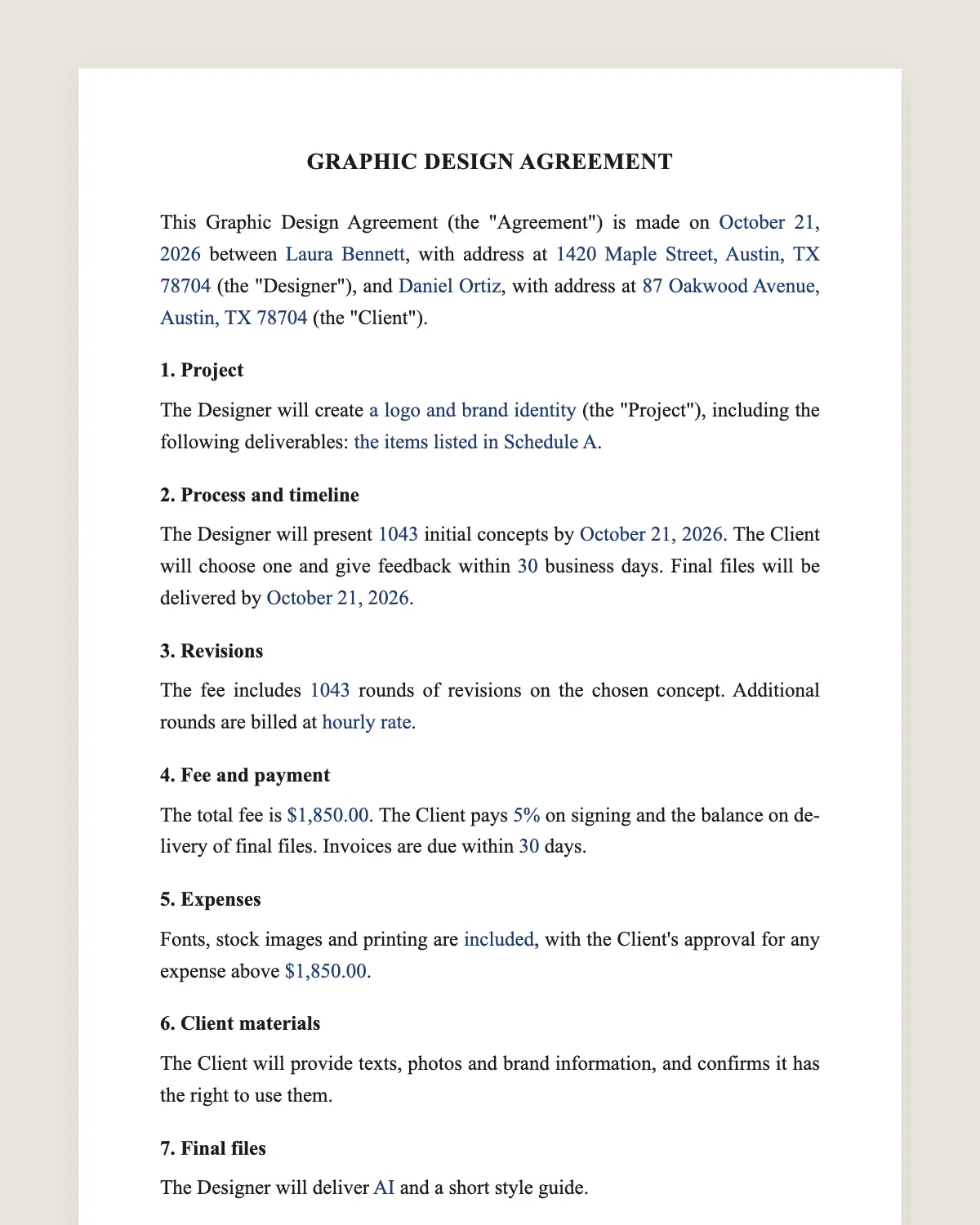
Graphic design contract example, filled in with sample data
Example filled in with sample data

The full graphic design contract

GRAPHIC DESIGN AGREEMENT

This Graphic Design Agreement (the "Agreement") is made on [date] between [Designer name or studio], with address at [address] (the "Designer"), and [Client legal name], with address at [address] (the "Client").

1. Project

The Designer will create [project description, for example a logo and brand identity] (the "Project"), including the following deliverables: [list of deliverables].

2. Process and timeline

The Designer will present [number] initial concepts by [date]. The Client will choose one and give feedback within [number] business days. Final files will be delivered by [date].

3. Revisions

The fee includes [number] rounds of revisions on the chosen concept. Additional rounds are billed at [hourly rate or fixed amount].

4. Fee and payment

The total fee is [amount]. The Client pays [percentage] on signing and the balance on delivery of final files. Invoices are due within [number] days.

5. Expenses

Fonts, stock images and printing are [included / billed to the Client at cost], with the Client's approval for any expense above [amount].

6. Client materials

The Client will provide texts, photos and brand information, and confirms it has the right to use them.

7. Final files

The Designer will deliver [file formats, for example AI, SVG, PNG and PDF] and a short style guide.

8. Ownership

On full payment, the Designer assigns to the Client all copyright in the final approved design. Concepts not chosen and preliminary work remain the property of the Designer.

9. Third-party elements

Licensed fonts and stock images stay under their own licenses. The Designer will tell the Client which licenses apply.

10. Portfolio

The Designer may show the final work in its portfolio and social media after the Client launches it, unless the Client asks otherwise in writing.

11. Cancellation

If the Client cancels, it pays for work done to that date and the deposit is not refunded. The Client receives no rights in work it has not paid for.

12. Independent contractor

The Designer is an independent contractor and is not an employee of the Client.

13. Governing law and signature

This Agreement is governed by the laws of [state]. The parties agree to sign it electronically, with the same effect as a handwritten signature.

Designer

Name: ______________

Date: ______________

Client

Name and title: ______________

Date: ______________

What the template includes

  • Project and list of deliverables
  • Concepts, feedback times and delivery date
  • Revision rounds included and extra rounds
  • Fee, deposit and payment terms
  • Fonts, stock images and printing costs
  • Client materials and rights to use them
  • File formats and style guide
  • Assignment of copyright on full payment
  • Licenses of third-party elements
  • Portfolio use
  • Cancellation fee, contractor status and governing law

What you fill in

FieldExample
DesignerNora Patel Studio
ClientGreenleaf Bakery LLC
ProjectLogo and brand identity
Concepts3 initial concepts
Revisions2 rounds
FeeUSD 3,200
Deposit50% on signing
FilesAI, SVG, PNG and PDF
DeliveryDecember 4, 2026

How it gets signed

  1. 1Choose «Use this template», fill in the fields and review the full graphic design contract.
  2. 2Send it by WhatsApp or email. The other party opens the link on their phone without an account.
  3. 3They tap the brown bar at the bottom that says «Sign as …» and draw their signature once.
  4. 4Everyone gets the signed PDF with its signature certificate. Anyone can check it at signsolu.com/verificar.

The signing screen tells each signer that signing means agreeing to sign electronically. It links to the electronic signature disclosure that the ESIGN Act asks for.

What you get once everyone signs

  • The signed PDF. The final graphic design contract with every drawn signature in place.
  • The signature certificate. It lists each signer and the date and time of each signature.
  • A record you can check. The folio on the certificate opens the document history at signsolu.com/verificar.
  • Reminders. Turn them on and SignSolú reminds every signer who has not signed yet.

Your first ten documents are free and need no card.

What the law says

Under 17 U.S.C. 101, work by an independent contractor is a "work made for hire" only in nine listed categories, and only if both parties agree in a written instrument signed by them. Outside those cases, the client owns the work only through a written assignment.

A logo made by a freelancer is not one of those nine categories. That is why clause 8 transfers copyright by assignment once the client pays.

The ESIGN Act, 15 U.S.C. 7001 gives an electronic signature the same legal effect as one on paper. A contract cannot be denied effect only because it was signed electronically.

Who owns the design

Without a written transfer, the designer usually keeps the copyright, even after payment. Clients rarely know this until they try to register a trademark.

Clause 8 solves it. The client owns the final design after paying in full, and the designer keeps the drafts the client did not choose.

If the client wants every concept too, raise the fee and change clause 8. Exclusive rights to unused ideas have real value to a designer.

Revisions that do not drag on

Unlimited revisions turn a two-week logo into a three-month project. Name the number of rounds and the price of each extra one.

Ask the client to send all feedback for a round at once. Scattered comments from five people count as one round only if they arrive together.

Freelance graphic design contracts

Freelancers use the same template for one-off projects. Change the fee to an hourly rate if the scope is uncertain, and set a cap.

For ongoing work, a monthly retainer with a set number of hours fits better. Write the hours, the rollover rule and the rate for extra hours.

Common mistakes

No deposit. A deposit filters out clients who are not serious and pays for the first concepts.

Delivering source files before payment. Clause 8 ties ownership to full payment. Send final files after the last invoice clears.

No feedback deadline. Projects stall when the client goes quiet. Clause 2 sets the days.

Example of a logo project

A bakery hires a designer for a logo and brand identity. The fee is USD 3,200 with half on signing.

The designer presents three concepts, the bakery picks one and two revision rounds follow. Final files arrive in AI, SVG, PNG and PDF with a one-page style guide.

After the last payment, the bakery owns the final logo and can register it as a trademark.

The bakery prints the new logo on boxes the following month. The designer adds the project to the portfolio after launch.

Before you sign

Other templates

Frequently asked questions

Is a graphic design contract signed online legally binding?

Yes. The ESIGN Act gives electronic signatures the same effect as handwritten ones. The signed PDF and its certificate show who signed and when.

Does the client own the logo automatically?

No. Copyright moves to the client through the written assignment in clause 8, once the client pays in full.

Can I use the work in my portfolio?

Yes, under clause 10, after the client launches it. The client can ask you not to in writing.

Does this work for web design?

For websites, the web design contract fits better. It covers hosting, launch and maintenance.

Can I charge for rush delivery?

Yes. Add a rush fee in clause 4 and the shorter dates in clause 2.

What if the client never approves a concept?

After the included rounds, extra rounds are billed under clause 3. The client can also cancel under clause 11.

Does the other party need a SignSolú account?

No. They open the link on their phone and sign with the brown bar at the bottom.

Can I edit the clauses before sending it?

Yes. After «Use this template» you can change any clause before you send it.

See also

Create a free account and send 10 documents