Event planner contract template: free in Word, or sign it online
Reviewed in October 2026
An event planner contract sets what the planner does for an event, from finding the venue to running the day. It covers the fee, the budget, how vendors are hired and paid, meetings, day-of coordination and cancellation. Wedding and corporate planners send it before work starts.
Ten documents free, no card. Signed by the planner and the client.
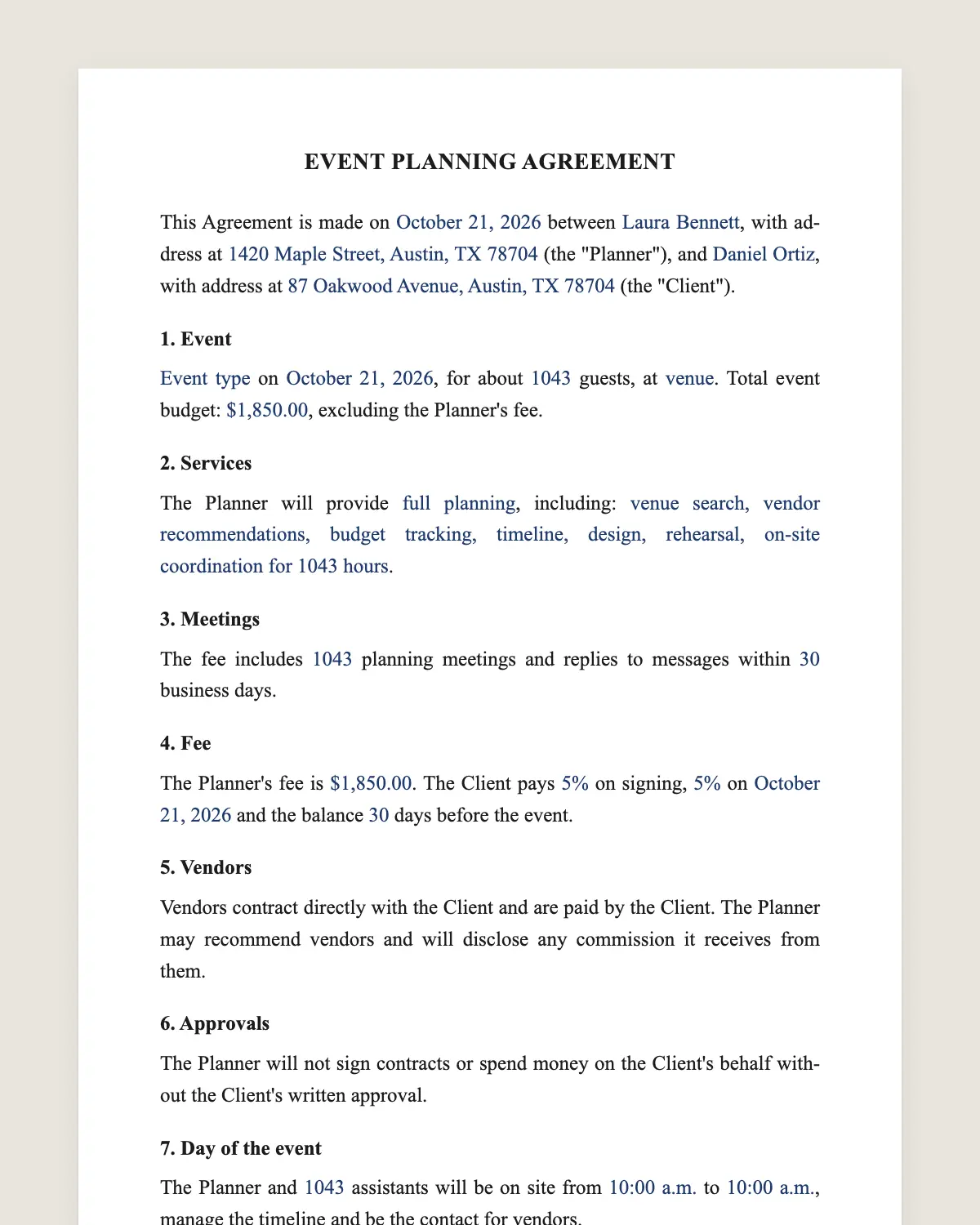
Example filled in with sample data
The full event planner contract
EVENT PLANNING AGREEMENT
This Agreement is made on [date] between [Planner name or company], with address at [address] (the "Planner"), and [Client name], with address at [address] (the "Client").
1. Event
[Event type] on [event date], for about [number] guests, at [venue or "to be selected"]. Total event budget: [amount], excluding the Planner's fee.
2. Services
The Planner will provide [full planning / partial planning / day-of coordination], including: [venue search, vendor recommendations, budget tracking, timeline, design, rehearsal, on-site coordination for [number] hours].
3. Meetings
The fee includes [number] planning meetings and replies to messages within [number] business days.
4. Fee
The Planner's fee is [flat amount or percentage of the budget]. The Client pays [percentage] on signing, [percentage] on [date] and the balance [number] days before the event.
5. Vendors
Vendors contract directly with the Client and are paid by the Client. The Planner may recommend vendors and will disclose any commission it receives from them.
6. Approvals
The Planner will not sign contracts or spend money on the Client's behalf without the Client's written approval.
7. Day of the event
The Planner and [number] assistants will be on site from [time] to [time], manage the timeline and be the contact for vendors.
8. Expenses
Travel beyond [distance], parking and any purchases made for the Client are reimbursed at cost, with receipts.
9. Cancellation and changes
If the Client cancels, payments made are non-refundable and amounts due before the cancellation date remain due. If the date changes, the Planner will try to serve the new date, subject to availability.
10. Limits
The Planner is not responsible for the performance of vendors, weather or the venue. The Planner's liability is limited to the fee paid.
11. Photos
The Planner may use event photos in its portfolio, subject to the photographer's permission and the Client's opt-out here: [ ].
12. Governing law and signature
This Agreement is governed by the laws of [state]. The parties agree to sign it electronically, with the same effect as a handwritten signature.
Planner
Name: ______________
Date: ______________
Client
Name: ______________
Date: ______________
What the template includes
Event, guest count and total budget
Planning level and services included
Meetings and response times
Fee and payment schedule
Vendors contracted by the client, with commissions disclosed
No spending without written approval
Day-of coordination hours and assistants
Reimbursable expenses
Cancellation and date changes
Limits of liability, portfolio use, governing law and electronic signature
What you fill in
Field
Example
Planner
Evergreen Events Co.
Client
Hannah Lee and Marcus Grant
Event
Wedding
Date
September 18, 2027
Guests
140
Budget
USD 55,000
Service level
Full planning
Fee
USD 6,000 flat
Day-of hours
12 hours with 2 assistants
How it gets signed
1Choose «Use this template», fill in the fields and review the full event planner contract.
2Send it by WhatsApp or email. The other party opens the link on their phone without an account.
3They tap the brown bar at the bottom that says «Sign as …» and draw their signature once.
4Everyone gets the signed PDF with its signature certificate. Anyone can check it at signsolu.com/verificar.
The signing screen tells each signer that signing means agreeing to sign electronically. It links to the electronic signature disclosure that the ESIGN Act asks for.
What you get once everyone signs
The signed PDF. The final event planner contract with every drawn signature in place.
The signature certificate. It lists each signer and the date and time of each signature.
A record you can check. The folio on the certificate opens the document history at signsolu.com/verificar.
Reminders. Turn them on and SignSolú reminds every signer who has not signed yet.
Your first ten documents are free and need no card.
What the law says
An event planning agreement is a service contract under state law. Courts look first at the scope, the payment schedule and the cancellation terms.
Planners who handle client money may face extra rules in some states. Clause 5 avoids most of that by having vendors bill the client directly.
The ESIGN Act, 15 U.S.C. 7001 gives an electronic signature the same legal effect as one on paper. A contract cannot be denied effect only because it was signed electronically.
Full planning, partial planning or day-of
Full planning starts a year or more before the event and covers every vendor and detail. It costs the most.
Partial planning picks up a few months before, usually after the venue is booked. The planner fills the gaps and builds the timeline.
Day-of coordination starts about a month out. The planner learns the plan and runs the event so the client can enjoy it.
Vendors and commissions
Clients trust planners who disclose vendor commissions. Clause 5 says it plainly and keeps the relationship clean.
Vendors sign their own contracts with the client. The planner sends them through SignSolú so all signed contracts sit in one place.
Example of a full-planning wedding
A couple hires a planner fourteen months before a 140-guest wedding with a USD 55,000 budget. The planner charges a USD 6,000 flat fee in three payments.
The planner finds the venue, recommends caterers and florists and tracks every deposit in a shared budget. On the day, the planner and two assistants run a twelve-hour timeline.
Each vendor contract goes out for signature from the planner's phone. The couple signs everything in the evenings, without printing a page.
Common mistakes
Unclear hours on the day. Write the start and end of on-site coordination.
Planner signs vendor contracts. Keep the client as the signer, as clause 5 says.
No meeting limit. Set the number of meetings included and the rate for more.
Budget tracking that clients trust
Share a simple budget sheet with every vendor, deposit and due date. Update it after each signed contract.
When the client sees where each dollar goes, approvals come faster and surprises disappear.
Attach the latest budget to the planning agreement as a reference. It is not binding, but it keeps everyone on the same page.
Communication rules
Agree on one channel for decisions, such as email or a shared chat. Decisions made in passing get lost.
Clause 3 sets response times. Clients relax when they know when to expect an answer.
After the event
Close the project with a short wrap-up. Confirm final vendor payments, returned rentals and any items left at the venue.
Send the client the signed contracts folder and the final budget. They have every record in one place.
Ask for a review while the day is fresh. Happy clients are the best source of new bookings.
Keep the signed planning agreement for your own records with the vendor contracts.
A thank-you note with a few favorite photos closes the project on a warm note.