Mobile home bill of sale template: free in Word, or sign it online
Reviewed in October 2026
A mobile home bill of sale records the sale of a manufactured or mobile home from one owner to another. It lists the serial or VIN, the HUD label, the location, the price and what is included. In many states the home is titled like a vehicle, so the bill of sale goes with the signed title.
Ten documents free, no card. Signed by the seller and the buyer.
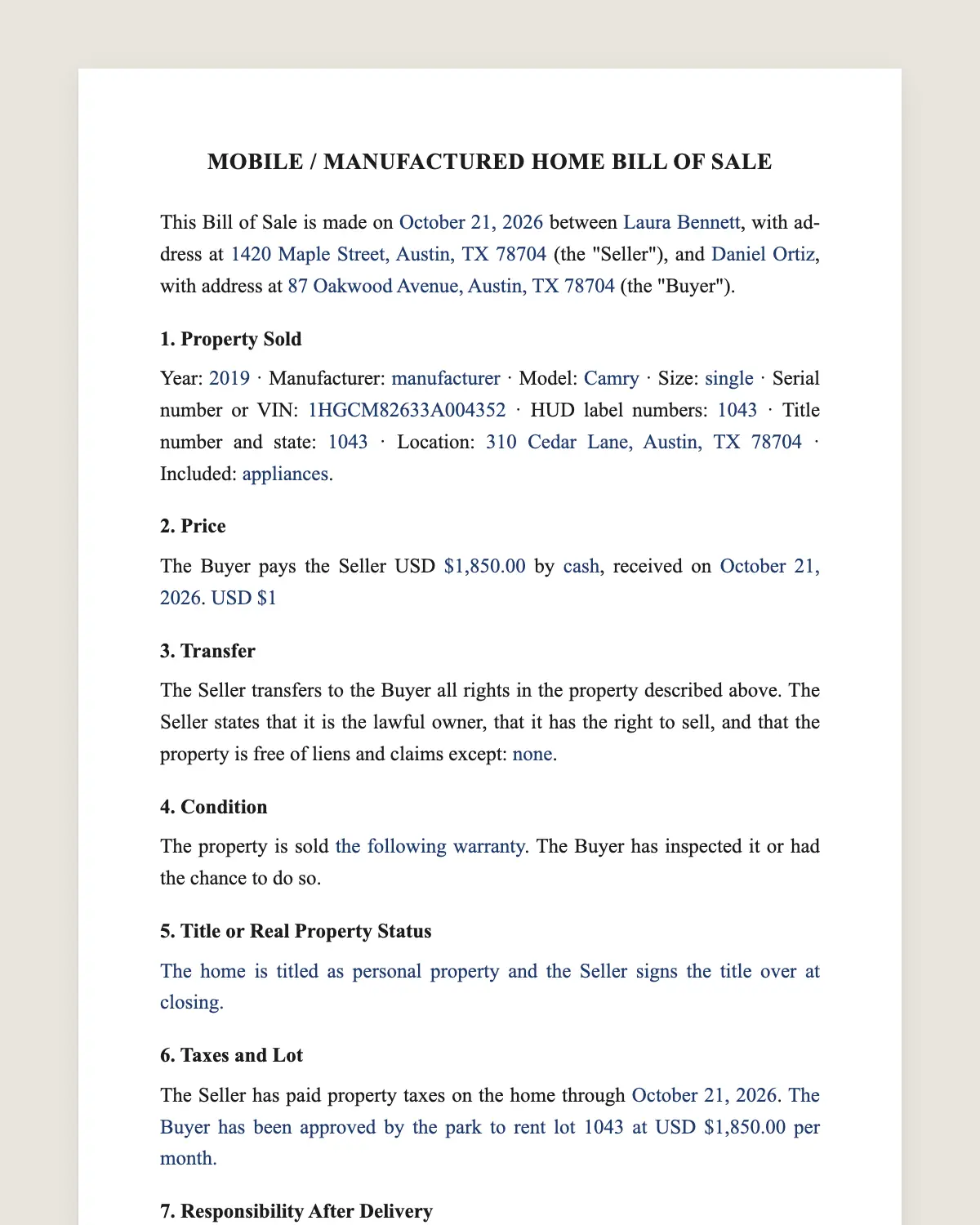
Example filled in with sample data
The full mobile home bill of sale
MOBILE / MANUFACTURED HOME BILL OF SALE
This Bill of Sale is made on [date] between [seller name], with address at [address] (the "Seller"), and [buyer name], with address at [address] (the "Buyer").
1. Property Sold
Year: [year] · Manufacturer: [manufacturer] · Model: [model] · Size: [single / double / triple wide, length x width] · Serial number or VIN: [number for each section] · HUD label numbers: [numbers] · Title number and state: [number, state] · Location: [address, park name and lot number] · Included: [appliances, skirting, steps, sheds, decks, air conditioning].
2. Price
The Buyer pays the Seller USD [amount] by [cash / cashier's check / bank transfer / payment app], received on [date]. [Or: USD [amount] today and the balance of USD [amount] by [date].]
3. Transfer
The Seller transfers to the Buyer all rights in the property described above. The Seller states that it is the lawful owner, that it has the right to sell, and that the property is free of liens and claims except: [none / describe].
4. Condition
The property is sold [as is, with no warranty of condition / with the following warranty: [details]]. The Buyer has inspected it or had the chance to do so.
5. Title or Real Property Status
[The home is titled as personal property and the Seller signs the title over at closing. / The home has been converted to real property and is sold with the land by deed. This bill of sale covers only the personal property listed.]
6. Taxes and Lot
The Seller has paid property taxes on the home through [date]. [The Buyer has been approved by the park to rent lot [number] at USD [amount] per month. / The home will be moved by the Buyer by [date] at its cost.]
7. Responsibility After Delivery
From the date and time of delivery, the Buyer is responsible for the property, its use, taxes, registration, insurance and any fines or tolls. The Seller remains responsible for anything that happened before delivery.
8. Governing Law and Signatures
This Bill of Sale is governed by the laws of the State of [state]. The parties agree to sign it electronically.
Seller
Name: [name]
Signature: ______________
Date: [date]
Buyer
Name: [name]
Signature: ______________
Date: [date]
What the template includes
Seller and buyer
Year, manufacturer, model and size
Serial number or VIN for each section
HUD label numbers
Title number and location
Included appliances and structures
Price and payment
Ownership and lien statement
As is or with warranty
Title or real property status
Taxes, park approval or moving
What you fill in
Field
Example
Seller
Donna Pierce
Buyer
Luis and Carmen Vega
Home
2008 Clayton, double wide, 56 x 28 ft
Serial numbers
CLW012345TNA and CLW012345TNB
Location
Shady Pines Park, lot 42, Lakeland, FL
Price
USD 58,000
Park approval
Approved, lot rent USD 690 a month
Taxes
Paid through 2026
How it gets signed
1Choose «Use this template», fill in the fields and review the full mobile home bill of sale.
2Send it by WhatsApp or email. The other party opens the link on their phone without an account.
3They tap the brown bar at the bottom that says «Sign as …» and draw their signature once.
4Everyone gets the signed PDF with its signature certificate. Anyone can check it at signsolu.com/verificar.
The signing screen tells each signer that signing means agreeing to sign electronically. It links to the electronic signature disclosure that the ESIGN Act asks for.
What you get once everyone signs
The signed PDF. The final mobile home bill of sale with every drawn signature in place.
The signature certificate. It lists each signer and the date and time of each signature.
A record you can check. The folio on the certificate opens the document history at signsolu.com/verificar.
Reminders. Turn them on and SignSolú reminds every signer who has not signed yet.
Your first ten documents are free and need no card.
What the law says
States treat manufactured homes in two ways. Many title them as personal property, like a vehicle. When a home is permanently attached to land the owner holds, many states allow converting it to real property.
If the home is titled, the title transfer happens at the motor vehicle or housing agency. If it is real property, the sale happens by deed with the land.
Homes built since June 15, 1976 carry a HUD certification label on each section. Write the label numbers in clause 1, since lenders and insurers ask for them.
The ESIGN Act, 15 U.S.C. 7001 gives an electronic signature the same legal effect as one on paper. A contract cannot be denied effect only because it was signed electronically.
Mobile home in a park or on private land
In a park, the buyer usually needs the park's approval before the sale closes. Ask the park for its application early.
On private land, the home may be sold with the land or moved. Moving needs a licensed mover and permits.
Clause 6 records which case applies. It prevents a buyer from owning a home with nowhere to keep it.
What to check before you buy
Title and liens. Search the state records for any lien on the home.
Taxes. Unpaid property taxes can follow the home.
HUD labels and data plate. They confirm the home meets the federal code.
Roof, floors and plumbing. Soft floors and leaks are common in older homes.
Park rules and lot rent. Read them before you commit.
Paying for a mobile home
Many mobile homes sell for cash or seller financing. Banks often finance only newer homes on owned land.
For seller financing, sign a separate promissory note and keep the title until the last payment, as your state allows.
Pay through a bank transfer or cashier's check. Large cash payments leave no record.
Common mistakes
Buying without park approval. The park can refuse a new resident. Get approval first.
Missing serial numbers for each section. A double wide has two. List both.
Forgetting the taxes. Ask for the tax receipt for the current year.
Signing the bill of sale online
Sellers and buyers often live in different cities. Send the bill of sale by WhatsApp or email.
Each one signs from the phone. The title transfer then follows your state's process.
Send the park application and the seller financing note the same way. The whole file is signed before moving day.
Before you sign
Read every clause of the mobile home bill of sale with the other party before anyone signs. Change what does not fit your deal.