Background check authorization form: free in Word, or sign it online
Reviewed in October 2026
A background check authorization form tells a job candidate that the employer may get a consumer report about them, and records their written permission. Under the Fair Credit Reporting Act, the disclosure must be in a document that consists solely of the disclosure. The authorization may be on the same page.
Ten documents free, no card. Signed by the candidate.
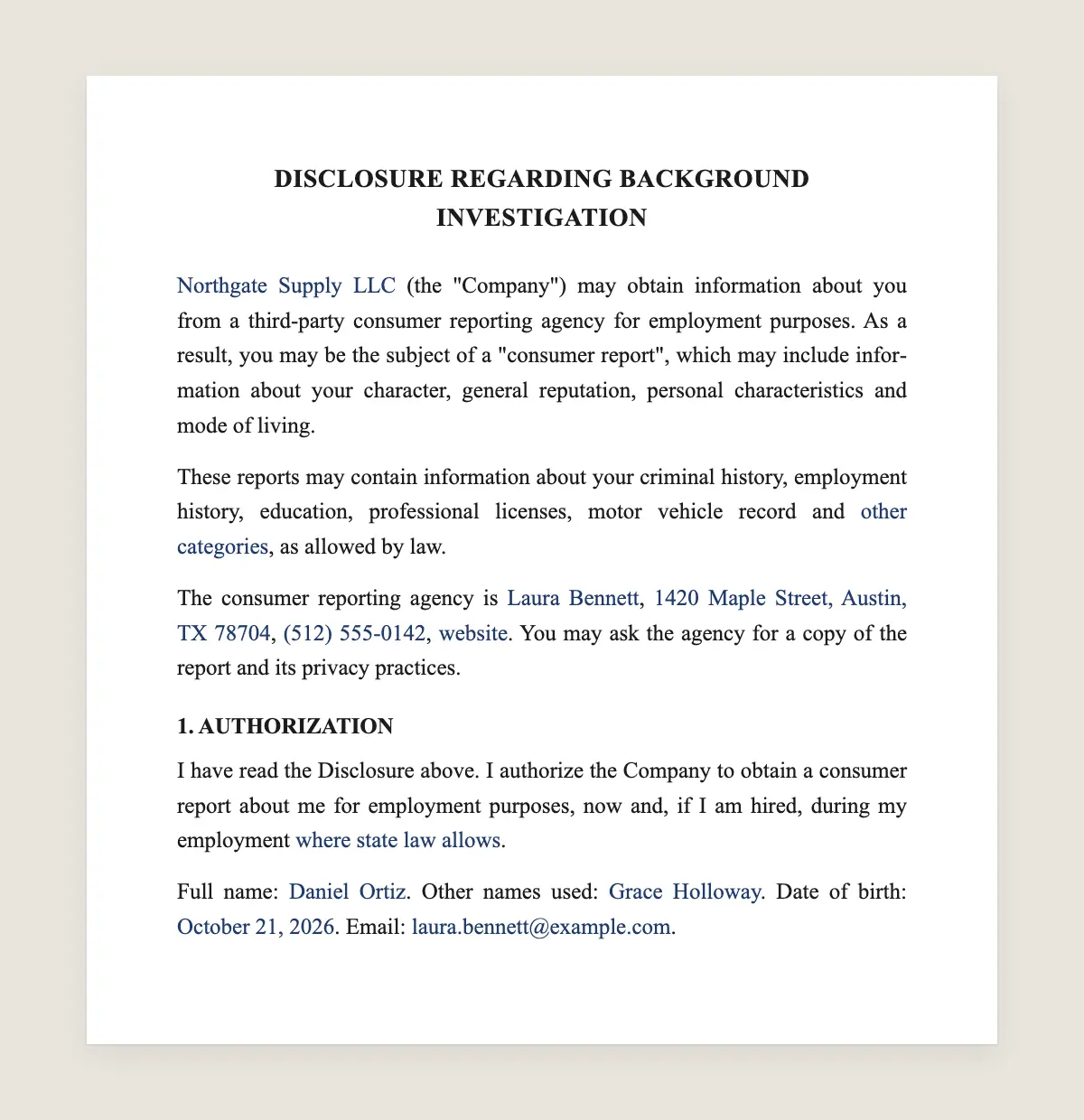
Example filled in with sample data
The full background check disclosure and authorization
DISCLOSURE REGARDING BACKGROUND INVESTIGATION
[Employer legal name] (the "Company") may obtain information about you from a third-party consumer reporting agency for employment purposes. As a result, you may be the subject of a "consumer report", which may include information about your character, general reputation, personal characteristics and mode of living.
These reports may contain information about your criminal history, employment history, education, professional licenses, motor vehicle record and [other categories], as allowed by law.
The consumer reporting agency is [agency name], [address], [phone], [website]. You may ask the agency for a copy of the report and its privacy practices.
1. AUTHORIZATION
I have read the Disclosure above. I authorize the Company to obtain a consumer report about me for employment purposes, now and, if I am hired, during my employment [where state law allows].
Full name: [full name]. Other names used: [other names]. Date of birth: [date, collected only after a conditional offer where required]. Email: [email].
Candidate
Date: ______________
What the template includes
Disclosure that a consumer report may be obtained
Types of information the report may contain
Name and contact details of the reporting agency
Written authorization from the candidate
Option to cover checks during employment
Identification data the agency needs
Nothing else on the page, as the law asks
What you fill in
Field
Example
Employer
Northgate Logistics Inc.
Agency
Name and contact of your screening provider
Report types
Criminal history, employment, education, driving record
Candidate
Ashley Nguyen
During employment
Yes
How it gets signed
1Choose «Use this template», fill in the fields and review the full background check disclosure and authorization.
2Send it by WhatsApp or email. The other party opens the link on their phone without an account.
3They tap the brown bar at the bottom that says «Sign as …» and draw their signature once.
4Everyone gets the signed PDF with its signature certificate. Anyone can check it at signsolu.com/verificar.
The signing screen tells each signer that signing means agreeing to sign electronically. It links to the electronic signature disclosure that the ESIGN Act asks for.
What you get once everyone signs
The signed PDF. The final background check disclosure and authorization with every drawn signature in place.
The signature certificate. It lists each signer and the date and time of each signature.
A record you can check. The folio on the certificate opens the document history at signsolu.com/verificar.
Reminders. Turn them on and SignSolú reminds every signer who has not signed yet.
Your first ten documents are free and need no card.
What the law says
The Fair Credit Reporting Act, 15 U.S.C. 1681b(b)(2), says a person may not procure a consumer report for employment purposes unless a clear and conspicuous disclosure has been made in writing to the consumer, in a document that consists solely of the disclosure.
The same section asks for the consumer's written authorization, which may be made on the disclosure document. That is why this template has the disclosure and the authorization, and nothing else.
Several states and cities add their own notices, and some limit when criminal history may be asked about. Send those notices as separate documents where they apply.
The ESIGN Act, 15 U.S.C. 7001 gives an electronic signature the same legal effect as one on paper. A contract cannot be denied effect only because it was signed electronically.
Why the form must stand alone
Employers often fold the disclosure into a long job application. The law asks for a document that consists solely of the disclosure.
Keep releases of liability, at-will statements and other terms off this page. Put them in the application or the offer letter instead.
Send this form as its own document in SignSolú. The candidate opens it alone, reads it and signs.
The order of the steps
Send the disclosure and get the signed authorization first. Only then ask the agency for the report.
If the report may lead you to reject the candidate, the law sets more steps before that decision. Your screening provider usually supplies the notices.
Checks during employment
The authorization can cover checks while the person works for you, where state law allows. The form has a line for that.
Many employers use it for drivers, whose motor vehicle record is checked once a year.
Example of a hiring flow
A logistics company makes a conditional offer to a driver. HR sends this form from SignSolú, and the candidate signs it on her phone that afternoon.
The signed PDF goes to the screening provider with the order. The certificate shows the authorization came before the report was requested.
Common mistakes
Extra terms on the disclosure. Keep only the disclosure and the authorization.
Ordering before the signature. Wait for the signed form.
One form for every state. Add the state notices where the candidate lives or works.
State and city notices
Some states ask employers to give their own notices next to the federal disclosure. Others limit what a report may include.
Several cities also restrict when an employer may ask about criminal history. Ask your screening provider which notices apply where the candidate lives and works.
Send each extra notice as its own document in the same request. The candidate signs them one after another, from the same link.
Keeping the records
Store the signed authorization with the report and any notices sent. If a candidate disputes a decision, you can show each step and its date.
Limit who can see background reports. They contain sensitive personal information.
Delete or archive reports on the schedule your policy and state law set.
Candidates who sign on their phone
Most candidates apply from their phone. Sending the authorization by WhatsApp or email lets them sign in a minute.
Faster signatures mean faster reports, and faster start dates for the people you want to hire.
What the candidate sees
The candidate receives a link, opens the one-page disclosure and reads it. They fill in their name and other names used.
They draw their signature with the brown bar at the bottom of the screen. A copy of the signed PDF arrives in their email.
The whole step takes about two minutes, with nothing to print or scan.
Employers who hire every week save the form as a template and send it with each conditional offer.
The candidate's signature and the date arrive before the order goes to the screening provider. That order of events is what the law looks for.
If the candidate has questions about the report, the disclosure already names the agency and how to reach it. That saves HR a round of emails.
Rejected candidates must receive the notices the law requires. Send them through the same tool, so every step sits in one record.