Employee loan agreement: free in Word, or sign it online
Reviewed in October 2026
An employee loan agreement records money an employer lends to an employee and how it is repaid. It sets the amount, interest if any, the payroll deduction for each paycheck and what happens to the balance if employment ends. Both sign before the money is paid.
Ten documents free, no card. Signed by the employer and the employee.
Example filled in with sample data
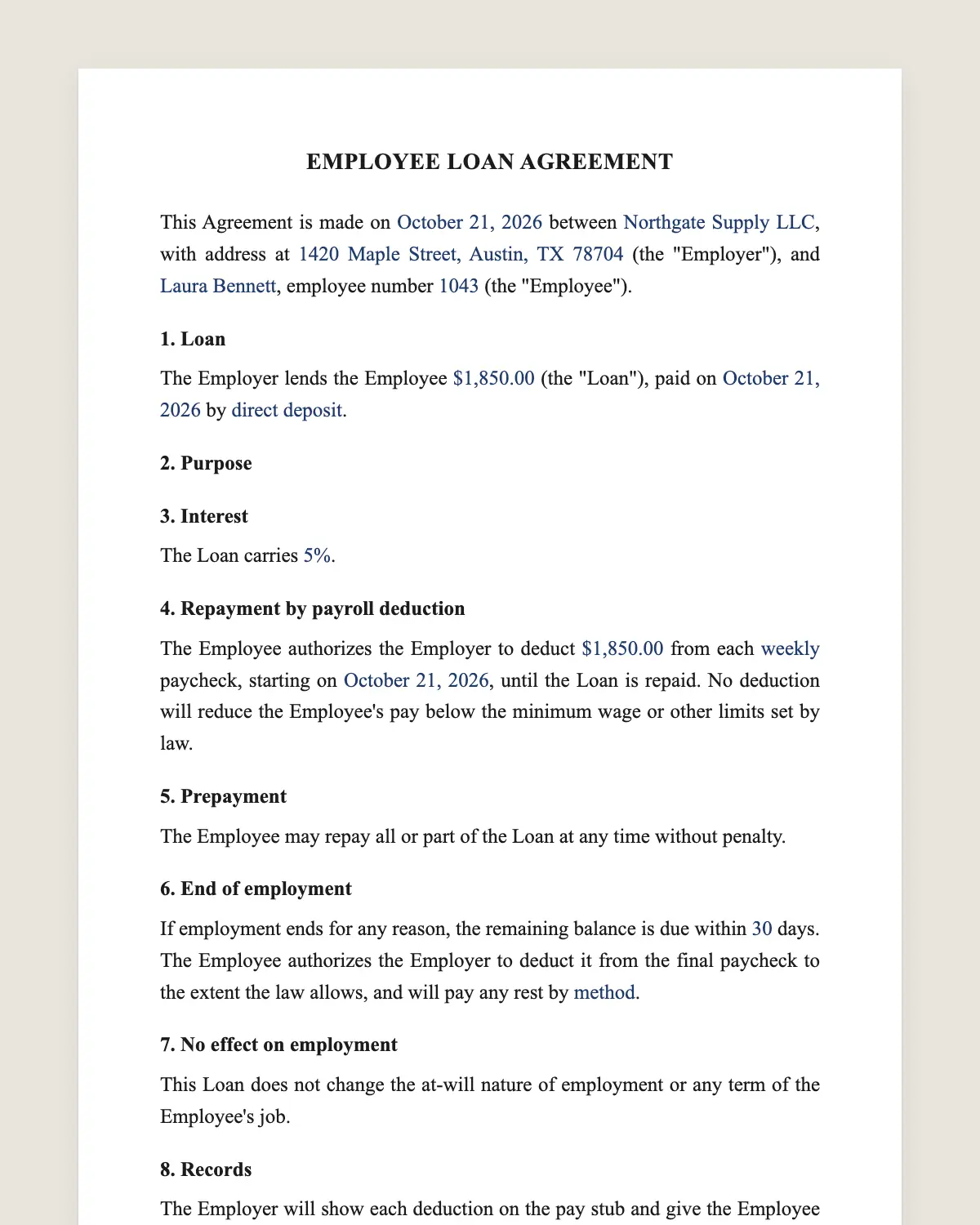
The full employee loan agreement
EMPLOYEE LOAN AGREEMENT
This Agreement is made on [date] between [Employer legal name], with address at [address] (the "Employer"), and [Employee name], employee number [number] (the "Employee").
1. Loan
The Employer lends the Employee [amount] (the "Loan"), paid on [date] by [direct deposit or check].
2. Purpose
[Optional: The Employee will use the Loan for [purpose].]
3. Interest
The Loan carries [no interest / interest of [percentage] per year on the unpaid balance].
4. Repayment by payroll deduction
The Employee authorizes the Employer to deduct [amount] from each [weekly, biweekly or monthly] paycheck, starting on [date], until the Loan is repaid. No deduction will reduce the Employee's pay below the minimum wage or other limits set by law.
5. Prepayment
The Employee may repay all or part of the Loan at any time without penalty.
6. End of employment
If employment ends for any reason, the remaining balance is due within [number] days. The Employee authorizes the Employer to deduct it from the final paycheck to the extent the law allows, and will pay any rest by [method].
7. No effect on employment
This Loan does not change the at-will nature of employment or any term of the Employee's job.
8. Records
The Employer will show each deduction on the pay stub and give the Employee the balance on request.
9. Governing law and signature
This Agreement is governed by the laws of [state]. The parties agree to sign it electronically, with the same effect as a handwritten signature.
Employer
Name and title: ______________
Date: ______________
Employee
Name: ______________
Date: ______________
What the template includes
Amount, payment date and method
Optional purpose
Interest or no interest
Payroll deduction amount and start date
Minimum wage protection on each deduction
Prepayment without penalty
Balance due when employment ends
No effect on the job itself
Deductions shown on pay stubs
Governing law and electronic signature
What you fill in
Field
Example
Employer
Summit HVAC Services LLC
Employee
Luis Romero
Loan
USD 2,400
Interest
None
Deduction
USD 100 per biweekly paycheck
First deduction
November 13, 2026
Balance due after leaving
30 days
How it gets signed
1Choose «Use this template», fill in the fields and review the full employee loan agreement.
2Send it by WhatsApp or email. The other party opens the link on their phone without an account.
3They tap the brown bar at the bottom that says «Sign as …» and draw their signature once.
4Everyone gets the signed PDF with its signature certificate. Anyone can check it at signsolu.com/verificar.
The signing screen tells each signer that signing means agreeing to sign electronically. It links to the electronic signature disclosure that the ESIGN Act asks for.
What you get once everyone signs
The signed PDF. The final employee loan agreement with every drawn signature in place.
The signature certificate. It lists each signer and the date and time of each signature.
A record you can check. The folio on the certificate opens the document history at signsolu.com/verificar.
Reminders. Turn them on and SignSolú reminds every signer who has not signed yet.
Your first ten documents are free and need no card.
What the law says
Federal and state wage rules govern deductions from pay. Your state may ask for a written authorization, limit the amount or protect the final paycheck.
Check those rules before the first deduction. Clause 4 also keeps each paycheck at or above the minimum wage as a contract promise.
Interest-free loans and below-market loans may have tax effects for both sides. Ask your accountant if the amount is large.
The ESIGN Act, 15 U.S.C. 7001 gives an electronic signature the same legal effect as one on paper. A contract cannot be denied effect only because it was signed electronically.
Why put a small loan in writing
Employers often lend to good employees after a car repair or a medical bill. Without a written agreement, the repayment depends on memory.
A signed agreement makes the deduction clear and protects the relationship. Nobody feels surprised by a smaller paycheck.
Setting a fair deduction
Keep each deduction small enough that the employee can still cover rent and food. A loan that causes hardship rarely ends well.
Many employers aim to recover the loan within six to twelve months. Divide the amount by the number of paychecks in that period.
Write the first deduction date after the next pay period starts. Payroll then has time to set it up.
When the employee leaves
Clause 6 makes the balance due and allows a deduction from the final check where the law permits. Final pay rules vary by state.
If the law limits the final deduction, the employee pays the rest directly. The agreement already says how.
Example of a repair loan
A technician needs USD 2,400 for a transmission. The employer lends it with no interest and deducts USD 100 from each biweekly check.
The loan is repaid in twenty-four paychecks. Each deduction appears on the pay stub with the remaining balance.
Common mistakes
Deducting without a signature. Get the signed authorization before the first deduction.
Deductions that leave too little. Check each paycheck, especially short weeks.
No end-of-job rule. Clause 6 settles the balance when someone leaves.
Loan or pay advance
A pay advance gives the employee wages already earned, a few days early. It is repaid from the next paycheck and needs little paperwork.
A loan is larger and is repaid over months. That is when a signed agreement, a schedule and a clear end-of-job rule matter most.
Some employers set a yearly limit on loans per employee. Write your policy down so every request is treated the same way.
Signing it without awkwardness
Money between a boss and an employee can feel personal. A standard agreement turns it into a simple, fair process.
Send it from SignSolú with the amount and schedule filled in. The employee reads it at home and signs from their phone.
Payroll receives the signed PDF and sets up the deduction. Nobody has to chase a paper signature in the break room.
Keep the signed agreement in the employee file with the pay stubs that show each deduction.
What to decide before lending
Decide the largest amount you will lend and the longest repayment period you accept. Apply the same limits to everyone who asks.
Decide whether you charge interest. Most small employers lend without interest to keep things simple and friendly.
Decide what happens if the employee asks for a second loan before the first is repaid. A written policy answers that before anyone asks.
Write the policy once and attach it to every loan agreement. Employees see the same rules apply to everyone.