Data privacy consent form: free in Word, or sign it online
Reviewed in October 2026
A data privacy consent form records that a person agreed to let you collect and use their personal information. It names the data, the purpose, who receives it and how long you keep it. It also tells the person how to withdraw consent and exercise their rights.
Ten documents free, no card. Signed by the data subject.
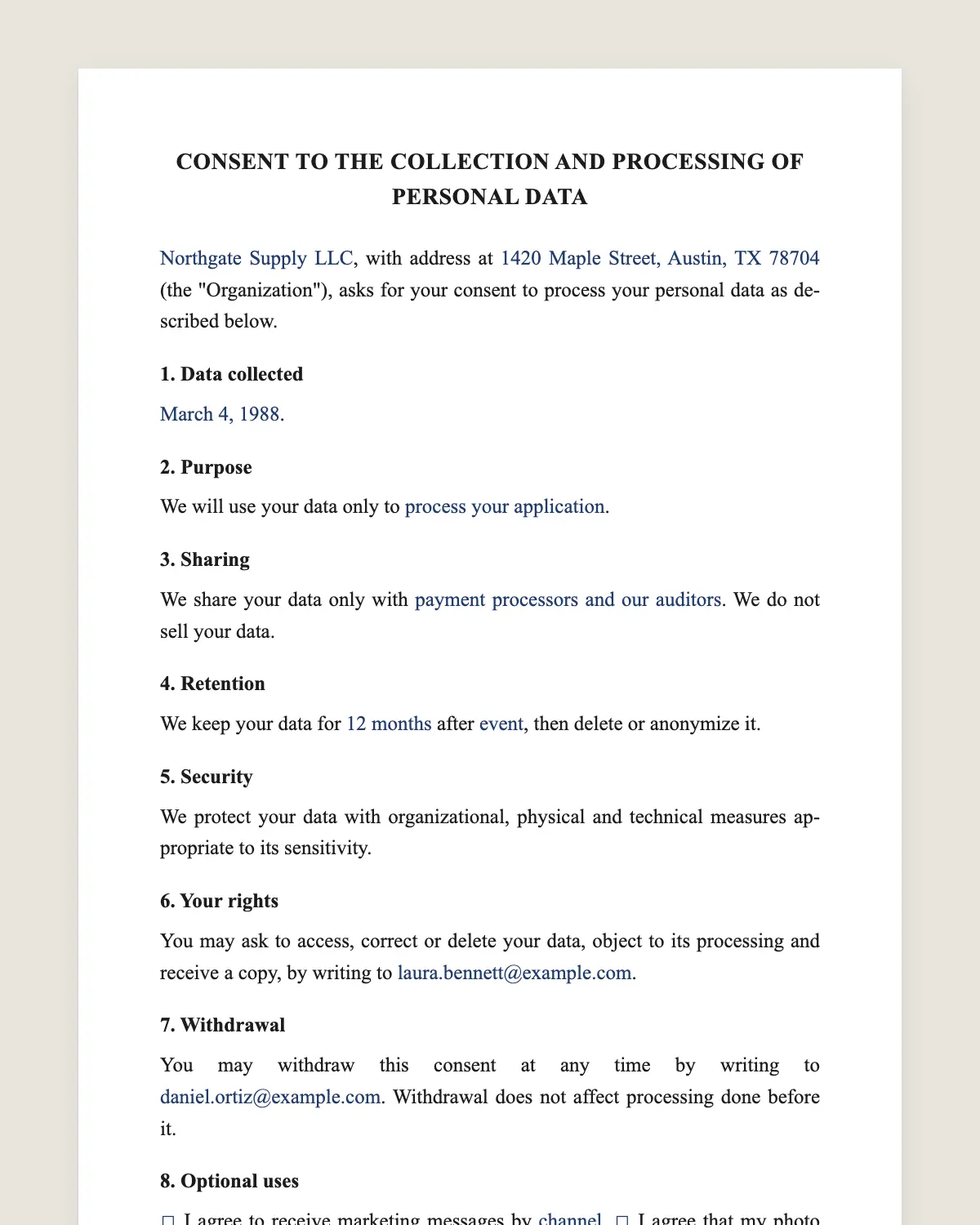
Example filled in with sample data
The full data privacy consent form
CONSENT TO THE COLLECTION AND PROCESSING OF PERSONAL DATA
[Organization legal name], with address at [address] (the "Organization"), asks for your consent to process your personal data as described below.
1. Data collected
[Full name, address, phone, email, date of birth, government ID number, other data]. [If it applies: Sensitive data: [health, financial or other sensitive data].]
2. Purpose
We will use your data only to [purposes, for example process your application, send service updates].
3. Sharing
We share your data only with [categories of recipients, for example payment processors and our auditors]. We do not sell your data.
4. Retention
We keep your data for [period] after [event], then delete or anonymize it.
5. Security
We protect your data with organizational, physical and technical measures appropriate to its sensitivity.
6. Your rights
You may ask to access, correct or delete your data, object to its processing and receive a copy, by writing to [privacy contact email].
7. Withdrawal
You may withdraw this consent at any time by writing to [privacy contact email]. Withdrawal does not affect processing done before it.
8. Optional uses
[ ] I agree to receive marketing messages by [channel]. [ ] I agree that my photo may be used in [materials]. These choices are optional.
9. Declaration
I have read this form, I understand how my personal data will be processed, and I give my consent freely.
Signature of the data subject
Printed name: ______________
Date: ______________
If the data subject is a minor
Name: Signature of parent or guardian
Printed name: ______________
Date: ______________
What the template includes
Who collects the data and how to reach them
List of personal data, with sensitive data marked
Purpose of each use
Recipients of the data
Retention period
Security measures
Rights of access, correction, deletion and objection
How to withdraw consent
Separate check boxes for optional uses
Declaration and signature, with a line for a guardian
What you fill in
Field
Example
Organization
Brightpath Learning Center Inc.
Data
Name, address, phone, email, date of birth
Purpose
Enrollment and class updates
Recipients
Payment processor and accountants
Retention
5 years after the last enrollment
Privacy contact
privacy@brightpath.example
Optional uses
Photos in the school newsletter
How it gets signed
1Choose «Use this template», fill in the fields and review the full data privacy consent form.
2Send it by WhatsApp or email. The other party opens the link on their phone without an account.
3They tap the brown bar at the bottom that says «Sign as …» and draw their signature once.
4Everyone gets the signed PDF with its signature certificate. Anyone can check it at signsolu.com/verificar.
What you get once everyone signs
The signed PDF. The final data privacy consent form with every drawn signature in place.
The signature certificate. It lists each signer and the date and time of each signature.
A record you can check. The folio on the certificate opens the document history at signsolu.com/verificar.
Reminders. Turn them on and SignSolú reminds every signer who has not signed yet.
Your first ten documents are free and need no card.
What the law says
In the Philippines, the Data Privacy Act of 2012, Republic Act 10173, defines consent as a freely given, specific and informed indication of will. Section 3(b) states that consent shall be evidenced by written, electronic or recorded means.
In the United States there is no single federal consent law for all personal data. State privacy laws and sector rules, such as health or education privacy, set their own requirements.
The ESIGN Act, 15 U.S.C. 7001 gives an electronic signature the same legal effect as one on paper. A contract cannot be denied effect only because it was signed electronically.
What makes consent valid
Freely given. The person can say no to optional uses and still receive the service.
Specific. Each purpose is named, not hidden in general terms.
Informed. The form says what data, why, who receives it and for how long.
Recorded. You can show when and how the person agreed.
A signed form with a certificate covers the last point. It records who signed, the date and the time.
Consent forms in the Philippines
Schools, clinics, employers and lenders in the Philippines often ask for a signed consent form at enrollment or hiring. The Data Privacy Act accepts consent given by electronic means.
Send the form by WhatsApp or email. The person reads it and signs from their phone, and you keep the signed PDF in their file.
Common mistakes
Bundling marketing with the service. Keep optional uses in separate check boxes, as clause 8 does.
No retention period. State how long you keep the data and what happens after.
No way to withdraw. Give an email address that someone actually reads.
Where organizations use it
Schools. Enrollment data, health notes and photos of students.
Clinics. Patient records and appointment reminders.
Employers. Hiring files, background checks and payroll data.
Lenders. Credit applications and identity documents.
Events. Registration lists and photos taken at the event.
Each use names its own purpose in clause 2. One form per purpose keeps consent specific and easy to withdraw.
Keeping the record
Store each signed form with the person's file. If a regulator or the person asks, you can show exactly what they agreed to and when.
When your purposes change, send a new form. Consent given for one purpose does not stretch to a new one.
Review the form once a year with whoever handles privacy in your organization. Update the retention period and the list of recipients when they change.
Plain language works better
People sign what they understand. Short sentences and named purposes earn more trust than long legal paragraphs.
Translate the form when your audience speaks another language. Consent in a language the person cannot read is hard to call informed.
Example of a clear purpose
A vague purpose says we may use your data to improve our services. A clear purpose says we use your phone number to send class schedule changes by text message.
The second version tells the person exactly what happens. That is the kind of purpose clause 2 asks for.
Write one line per purpose. If a use is optional, move it to clause 8 with its own check box.
Read the finished form as if you were the person signing it. If any line needs a lawyer to explain it, rewrite that line.
Test the form with two or three people outside your team. Ask them to explain back, in their own words, what they agreed to.
If they cannot, simplify the wording before you send it to everyone. Clear forms get signed faster, questioned less and withdrawn less often.