Location release form: free in Word, or sign it online
Reviewed in October 2026
A location release form gives a production permission to film or photograph on a property. It sets the dates, the areas allowed, the fee and who pays for damage. It also lets the production use the footage of the property without further approval.
Ten documents free, no card. Signed by the property owner and the production.
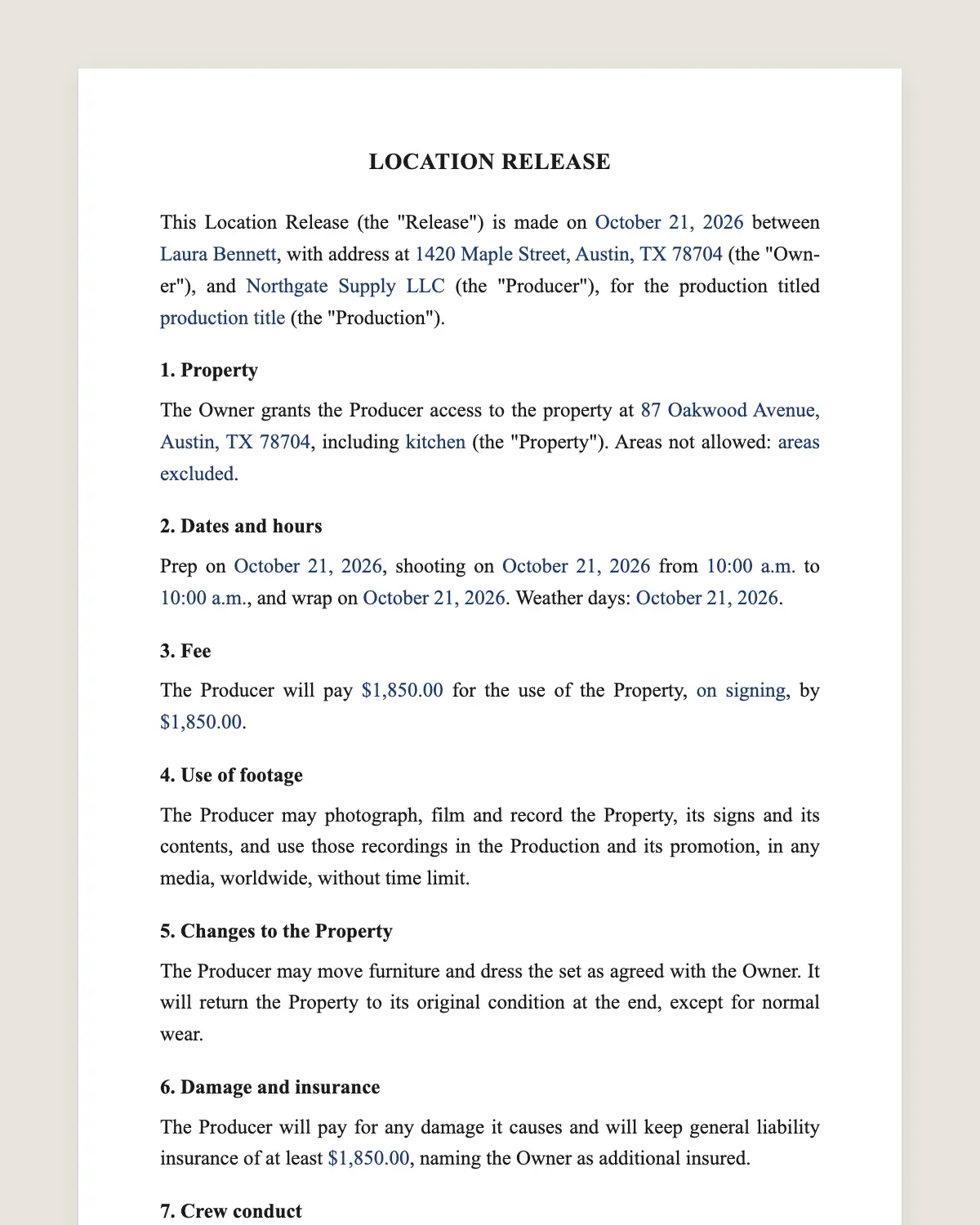
Example filled in with sample data
The full location release form
LOCATION RELEASE
This Location Release (the "Release") is made on [date] between [Owner full name or company], with address at [address] (the "Owner"), and [Production company legal name] (the "Producer"), for the production titled [production title] (the "Production").
1. Property
The Owner grants the Producer access to the property at [address], including [areas allowed, for example kitchen, backyard, front facade] (the "Property"). Areas not allowed: [areas excluded].
2. Dates and hours
Prep on [dates], shooting on [dates] from [start time] to [end time], and wrap on [dates]. Weather days: [backup dates].
3. Fee
The Producer will pay [amount] for the use of the Property, [on signing or on the last shoot day], by [payment method].
4. Use of footage
The Producer may photograph, film and record the Property, its signs and its contents, and use those recordings in the Production and its promotion, in any media, worldwide, without time limit.
5. Changes to the Property
The Producer may move furniture and dress the set as agreed with the Owner. It will return the Property to its original condition at the end, except for normal wear.
6. Damage and insurance
The Producer will pay for any damage it causes and will keep general liability insurance of at least [amount], naming the Owner as additional insured.
7. Crew conduct
The crew will follow the Owner's rules on parking, smoking, noise and access, listed here: [rules].
8. No obligation to use
The Producer is not obliged to use the footage. The fee is earned on the shoot days whether or not the footage appears in the Production.
9. Authority
The Owner states that it owns or controls the Property and may grant this Release, and that no other consent is needed.
10. Governing law and signature
This Release is governed by the laws of [state]. The parties agree to sign it electronically, with the same effect as a handwritten signature.
Owner
Printed name: ______________
Date: ______________
Producer
Name and title: ______________
Date: ______________
What the template includes
Property, allowed areas and excluded areas
Prep, shoot, wrap and weather days
Location fee and payment date
Worldwide use of footage in any media
Set dressing and return to original condition
Damage, liability insurance and additional insured
Crew rules
No obligation to use the footage
Owner's authority to grant the release
Governing law and electronic signature
What you fill in
Field
Example
Owner
Grace and Leon Porter
Producer
Northlight Films LLC
Production
Short film "Second Spring"
Property
18 Birch Lane, Asheville, NC
Allowed areas
Kitchen, living room, backyard
Shoot dates
November 12 and 13, 2026
Fee
USD 1,500
Insurance
USD 1,000,000 general liability
How it gets signed
1Choose «Use this template», fill in the fields and review the full location release form.
2Send it by WhatsApp or email. The other party opens the link on their phone without an account.
3They tap the brown bar at the bottom that says «Sign as …» and draw their signature once.
4Everyone gets the signed PDF with its signature certificate. Anyone can check it at signsolu.com/verificar.
The signing screen tells each signer that signing means agreeing to sign electronically. It links to the electronic signature disclosure that the ESIGN Act asks for.
What you get once everyone signs
The signed PDF. The final location release form with every drawn signature in place.
The signature certificate. It lists each signer and the date and time of each signature.
A record you can check. The folio on the certificate opens the document history at signsolu.com/verificar.
Reminders. Turn them on and SignSolú reminds every signer who has not signed yet.
Your first ten documents are free and need no card.
What the law says
A location release is a contract. State contract and property law decide how it is read, and the owner must have the right to grant access.
Many cities also ask productions for a film permit to shoot on public streets or sidewalks. That permit is separate from the owner's release.
The ESIGN Act, 15 U.S.C. 7001 gives an electronic signature the same legal effect as one on paper. A contract cannot be denied effect only because it was signed electronically.
Location release or location agreement
Small shoots use a short release like this one. Feature films often sign a longer location agreement with detailed schedules and riders.
Both do the same job. They give access, set the fee and clear the footage for use.
Before the shoot day
Walk the property with the owner and take photos of every room you will use.
Agree on parking for crew trucks and equipment.
Send the insurance certificate naming the owner.
Share the call sheet with arrival and wrap times.
Attach the photos to the release before you send it. Both sides sign the same record of how the property looked.
Common mistakes
A tenant signs instead of the owner. Check that the signer owns or controls the property, as clause 9 requires.
No backup dates. Rain moves outdoor shoots. List weather days in clause 2.
Limited media rights. Streaming and social clips need the worldwide, any-media wording in clause 4.
Setting the location fee
Fees depend on the size of the crew, the number of days and how much of the property is used. A small crew in one room pays far less than a full set.
Prep and wrap days usually pay less than shoot days. Write each rate in clause 3 so the total is clear before the crew arrives.
Owners sometimes ask for a deposit at signing. It covers the hold on the dates if the production cancels late.
Releases for businesses
Restaurants, shops and offices sign the same release. Add the hours the business stays closed and any lost revenue the fee covers.
A business that rents its space must check its lease. Some leases need the landlord's consent before filming.
Signing with the whole crew in motion
Location managers send the release from their phone while scouting. The owner signs on the spot, and the signed PDF goes to production right away.
Every signed release stays in one place with its certificate. The legal team finds them in seconds when the distributor asks for clearances.
When the property appears in the final cut
Clause 4 lets the production use the footage worldwide and without time limit. That covers festivals, streaming, trailers and social clips.
Owners who want privacy can ask to blur house numbers or signs. Write that request in clause 4 before signing.
If the owner wants a screen credit, add a line with the exact wording. Credits are cheap for the production and matter to many owners.
Return the property on time and in the condition you found it. Owners talk to each other, and a good wrap opens doors for the next shoot.
Send the owner a thank-you note with the release date of the production.