Investment contract template: free in Word, or sign it online
Reviewed in October 2026
An investment contract records money an investor puts into a business in exchange for equity or a share of profits. It sets the amount, what the investor receives, their rights and how they get out. This template covers a direct investment in a small private company.
Ten documents free, no card. Signed by the company and the investor.
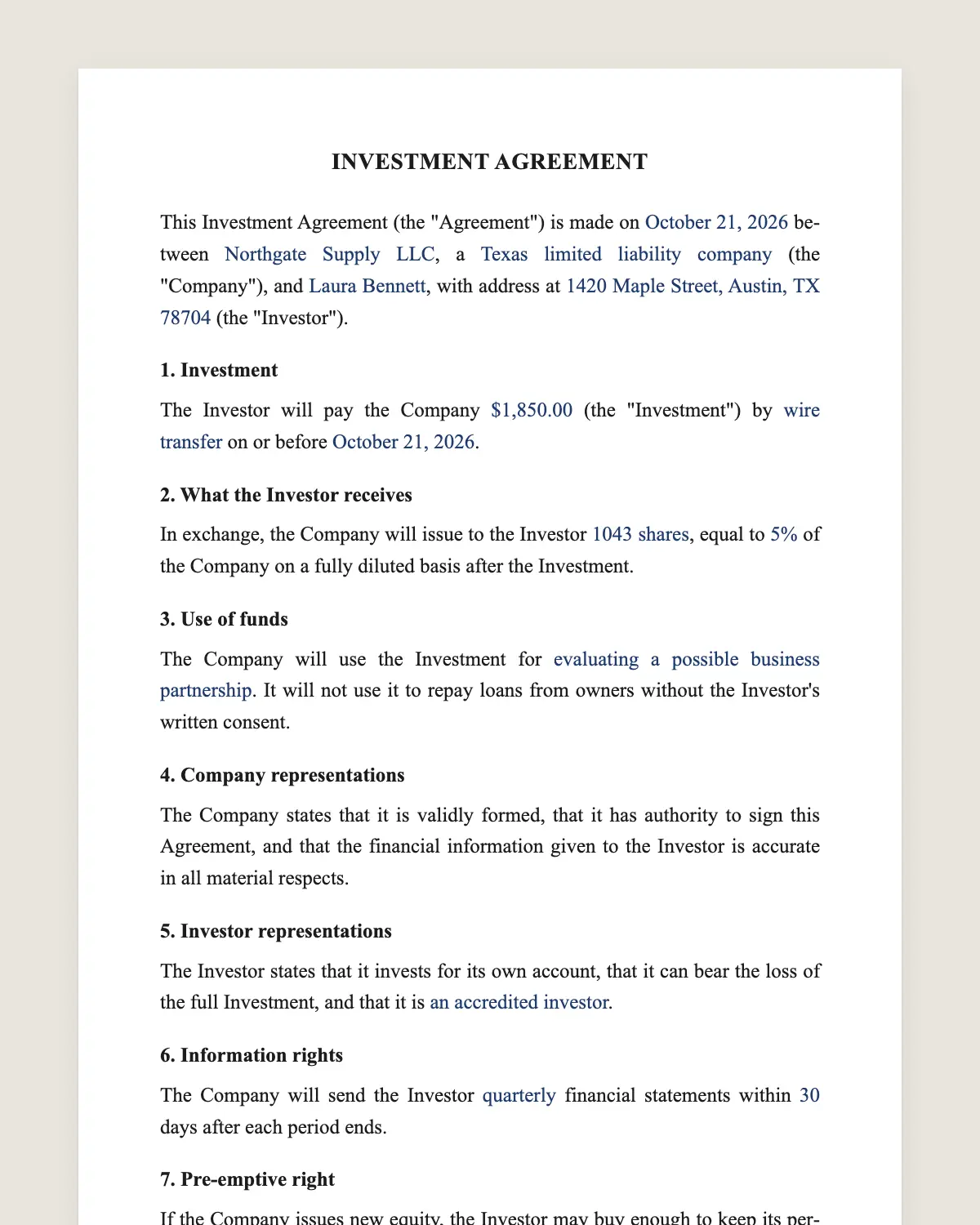
Example filled in with sample data
The full investment contract
INVESTMENT AGREEMENT
This Investment Agreement (the "Agreement") is made on [date] between [Company legal name], a [state] [entity type] (the "Company"), and [Investor name], with address at [address] (the "Investor").
1. Investment
The Investor will pay the Company [amount] (the "Investment") by [wire transfer or check] on or before [date].
2. What the Investor receives
In exchange, the Company will issue to the Investor [number] [shares or units], equal to [percentage] of the Company on a fully diluted basis after the Investment.
3. Use of funds
The Company will use the Investment for [purposes]. It will not use it to repay loans from owners without the Investor's written consent.
4. Company representations
The Company states that it is validly formed, that it has authority to sign this Agreement, and that the financial information given to the Investor is accurate in all material respects.
5. Investor representations
The Investor states that it invests for its own account, that it can bear the loss of the full Investment, and that it is [an accredited investor or other status].
6. Information rights
The Company will send the Investor [quarterly or annual] financial statements within [number] days after each period ends.
7. Pre-emptive right
If the Company issues new equity, the Investor may buy enough to keep its percentage, on the same terms offered to others.
8. Transfer
The Investor may not sell or transfer its [shares or units] without the Company's consent, except to an affiliate or a family trust.
9. Exit
If the Company is sold, the Investor receives its share of the proceeds in proportion to its percentage, after debts are paid.
10. Risk
The Investor understands that the Investment is illiquid and may be lost in full. The Company does not guarantee any return.
11. Governing law and signature
This Agreement is governed by the laws of [state]. The parties agree to sign it electronically, with the same effect as a handwritten signature.
Company
Name and title: ______________
Date: ______________
Investor
Name: ______________
Date: ______________
What the template includes
Amount, payment method and deadline
Equity or units issued and the resulting percentage
How the company may use the money
Statements from the company about itself
Statements from the investor about risk and status
Financial reports the investor receives
Right to keep the same percentage in later rounds
Limits on selling the stake
Share of proceeds on a sale
Plain risk statement
Governing law and electronic signature
What you fill in
Field
Example
Company
Northline Coffee Roasters LLC
Investor
Grace Whitfield
Investment
USD 150,000
Equity
1,500 units, 12% fully diluted
Use of funds
Second roasting line and working capital
Reports
Quarterly, within 45 days
Investor status
Accredited investor
Governing law
State of Oregon
How it gets signed
1Choose «Use this template», fill in the fields and review the full investment contract.
2Send it by WhatsApp or email. The other party opens the link on their phone without an account.
3They tap the brown bar at the bottom that says «Sign as …» and draw their signature once.
4Everyone gets the signed PDF with its signature certificate. Anyone can check it at signsolu.com/verificar.
The signing screen tells each signer that signing means agreeing to sign electronically. It links to the electronic signature disclosure that the ESIGN Act asks for.
What you get once everyone signs
The signed PDF. The final investment contract with every drawn signature in place.
The signature certificate. It lists each signer and the date and time of each signature.
A record you can check. The folio on the certificate opens the document history at signsolu.com/verificar.
Reminders. Turn them on and SignSolú reminds every signer who has not signed yet.
Your first ten documents are free and need no card.
What the law says
Selling equity to an investor is an offer of securities under federal and state law. Private companies usually rely on an exemption, so the investor representations in clause 5 matter.
The investor's status, such as accredited investor, decides which exemptions are open. Confirm the exemption with your counsel before taking the money.
The ESIGN Act, 15 U.S.C. 7001 gives an electronic signature the same legal effect as one on paper. A contract cannot be denied effect only because it was signed electronically.
Documents to attach
Cap table. Who owns what before and after the investment.
Latest financial statements. Income statement and balance sheet.
Operating agreement or bylaws. The rules the investor joins.
Use of funds plan. A one-page budget for the money.
Upload them with the contract. The investor reviews every page from one link and signs once at the end.
Equity, convertible note or SAFE
This template issues equity now, at a price both sides agree. It suits small businesses that can set a value today.
Early startups often use a convertible note or a SAFE instead. Those turn into equity later, when a larger round sets the price.
What investors read first
Percentage after the investment. Fully diluted, including options.
Information rights. How often they will see numbers.
Pre-emptive right. Whether they can keep their share in later rounds.
Use of funds. Where the money goes.
Common mistakes
Promising a fixed return. Equity carries risk. A guaranteed return turns the deal into a loan with different rules.
Skipping the cap table. Attach the ownership table so the investor sees the full picture before signing.
How the investor gets out
Private company investments are hard to sell. Most investors get their money back when the company is sold or buys back their stake.
Some contracts add a put option after a number of years. It lets the investor ask the company to buy the stake at a set formula.
If you add one, set the price formula and the payment schedule. A put that the company cannot pay helps no one.
Example of a small business round
A coffee roaster raises USD 150,000 from one local investor for a second roasting line. The investor receives 12% of the units and quarterly reports.
The contract names the line and the working capital as the use of funds. The investor can keep 12% in any later round.
If the roaster sells in five years for USD 2 million, the investor receives 12% of what remains after debts. The contract says so in clause 9.
Nothing in the contract promises that sale. Clause 10 states the risk plainly, and both parties sign it with that in view.
Signing with more than one investor
Use the same template for each investor and change only the amount and units. Every investor signs their own copy from their phone.
The company signs once per contract. SignSolú keeps all of them with their certificates for the next audit or round.