SignSolú

Managed services agreement template: free in Word, or sign it online

Reviewed in October 2026

A managed services agreement is the contract between a managed service provider and a client that outsources ongoing IT work. It covers the devices and users supported, monitoring, help desk hours, response times, security duties, the monthly fee and what is billed apart.

Ten documents free, no card. Signed by the provider and the client.

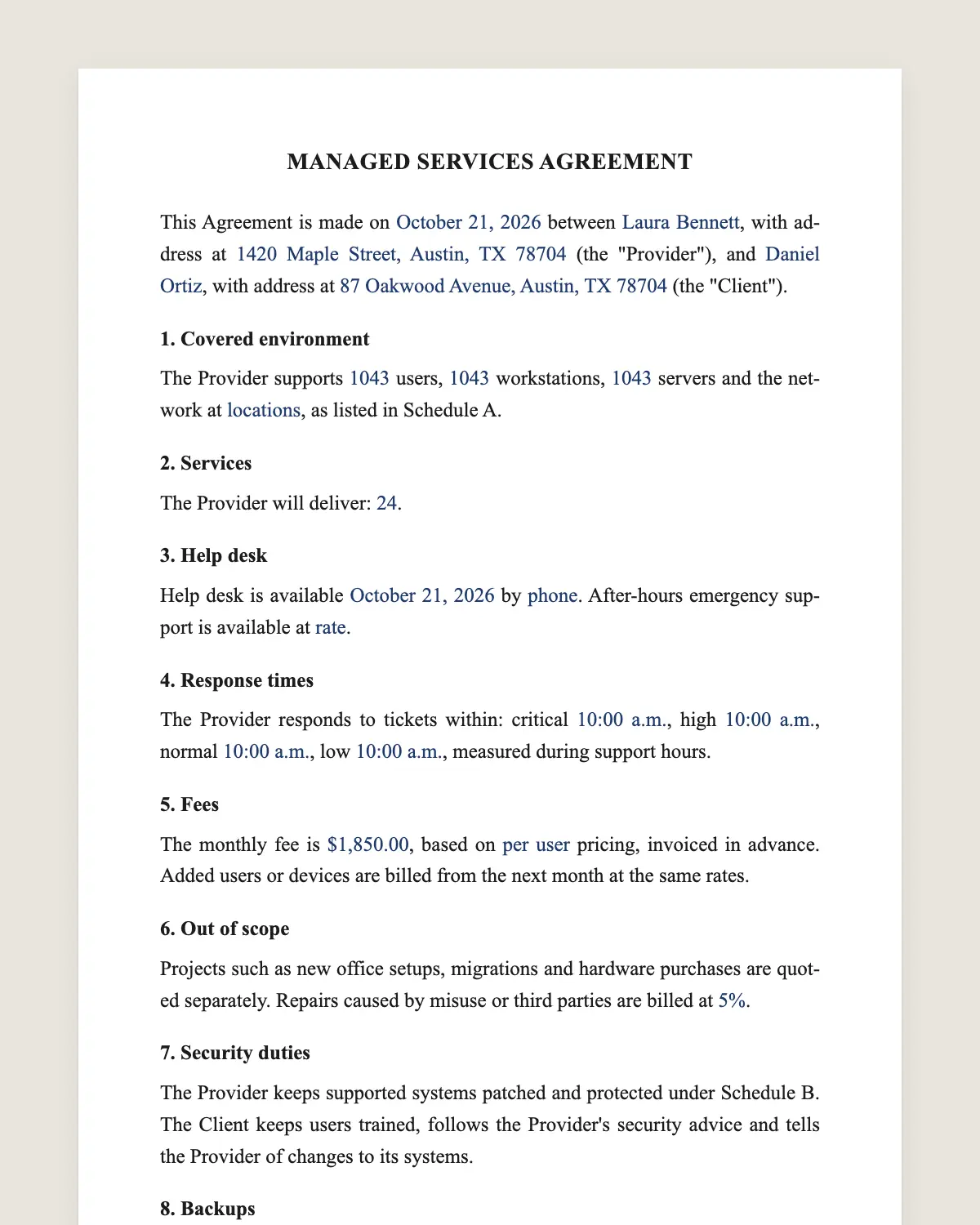
Managed services agreement example, filled in with sample data
Example filled in with sample data

The full managed services agreement

MANAGED SERVICES AGREEMENT

This Agreement is made on [date] between [Provider legal name], with address at [address] (the "Provider"), and [Client legal name], with address at [address] (the "Client").

1. Covered environment

The Provider supports [number] users, [number] workstations, [number] servers and the network at [locations], as listed in Schedule A.

2. Services

The Provider will deliver: [24/7 monitoring, patch management, antivirus and endpoint protection, backup management, help desk, vendor management, quarterly reviews].

3. Help desk

Help desk is available [days and hours, time zone] by [phone, email, portal]. After-hours emergency support is available at [rate or included].

4. Response times

The Provider responds to tickets within: critical [time], high [time], normal [time], low [time], measured during support hours.

5. Fees

The monthly fee is [amount], based on [per user or per device] pricing, invoiced in advance. Added users or devices are billed from the next month at the same rates.

6. Out of scope

Projects such as new office setups, migrations and hardware purchases are quoted separately. Repairs caused by misuse or third parties are billed at [hourly rate].

7. Security duties

The Provider keeps supported systems patched and protected under Schedule B. The Client keeps users trained, follows the Provider's security advice and tells the Provider of changes to its systems.

8. Backups

The Provider manages backups of [systems] with [frequency] and tests restores [quarterly]. Recovery targets are in Schedule B.

9. Access and data

The Client grants the Provider administrative access needed for the services. The Provider keeps Client data confidential and uses it only to deliver the services.

10. Limitation of liability

The Provider's total liability is limited to the fees paid in the [number] months before the claim, except for gross negligence or willful misconduct.

11. Term and termination

This Agreement lasts [number] months and renews for [period]. Either party may end it with [number] days of notice before renewal. At the end, the Provider hands over passwords, documentation and data within [number] days.

12. Governing law and signature

This Agreement is governed by the laws of [state]. The parties agree to sign it electronically, with the same effect as a handwritten signature.

Schedule A. Covered users, devices and locations. Schedule B. Security baseline and backup targets.

Provider

Name and title: ______________

Date: ______________

Client

Name and title: ______________

Date: ______________

What the template includes

  • Users, devices and locations covered
  • Monitoring, patching, endpoint protection and backups
  • Help desk hours and channels
  • Response times by priority
  • Monthly fee per user or device
  • Projects and repairs outside the scope
  • Security duties on both sides
  • Backup frequency and restore tests
  • Administrative access and confidentiality
  • Liability cap
  • Term, renewal and handover at the end
  • Governing law and electronic signature

What you fill in

FieldExample
ProviderBluepeak IT Services LLC
ClientHartman & Cole CPAs
Users35
Devices40 workstations, 2 servers
Help deskMonday to Friday, 7 am to 7 pm Central
Critical response30 minutes
Monthly feeUSD 125 per user
Term24 months
Handover15 days

How it gets signed

  1. 1Choose «Use this template», fill in the fields and review the full managed services agreement.
  2. 2Send it by WhatsApp or email. The other party opens the link on their phone without an account.
  3. 3They tap the brown bar at the bottom that says «Sign as …» and draw their signature once.
  4. 4Everyone gets the signed PDF with its signature certificate. Anyone can check it at signsolu.com/verificar.

The signing screen tells each signer that signing means agreeing to sign electronically. It links to the electronic signature disclosure that the ESIGN Act asks for.

What you get once everyone signs

  • The signed PDF. The final managed services agreement with every drawn signature in place.
  • The signature certificate. It lists each signer and the date and time of each signature.
  • A record you can check. The folio on the certificate opens the document history at signsolu.com/verificar.
  • Reminders. Turn them on and SignSolú reminds every signer who has not signed yet.

Your first ten documents are free and need no card.

What the law says

A managed services agreement is a contract under state law. Some clients, such as health care and financial firms, also need their providers to follow rules on data security and to sign extra agreements.

If the provider handles personal data for the client, a data processing agreement or similar addendum may be needed.

The ESIGN Act, 15 U.S.C. 7001 gives an electronic signature the same legal effect as one on paper. A contract cannot be denied effect only because it was signed electronically.

MSA and statements of work

Many providers use the MSA as a master agreement and add statements of work for projects. The MSA sets the rules once.

Each project then needs only a short statement of work with its scope and price. Clients sign it from their phone.

Response times that clients understand

Define each priority with an example. Critical means the whole office cannot work. Low means a single user has a minor issue.

Measure response, not resolution, unless you can promise fix times. Clause 4 measures response during support hours.

Security is shared

The provider patches and protects. The client trains its people and follows advice, such as enabling multi-factor login.

Writing both sides in clause 7 avoids blame after an incident. It also shows insurers that duties were clear.

Example of a small office account

An accounting firm with thirty-five users signs a two-year agreement at USD 125 per user each month. Critical tickets receive a response within thirty minutes.

Backups run nightly and restores are tested every quarter. If the firm leaves, the provider hands over passwords and documentation within fifteen days.

Common mistakes

No device list. Attach Schedule A and update it when users join or leave.

Unclear projects. Say what is in the monthly fee and what is quoted apart.

No exit plan. Clause 11 sets the handover so the client is never locked out.

Onboarding a new client

The first month is about discovery. The provider documents every device, account and vendor, and fixes urgent security gaps.

Agree on an onboarding fee for that work, separate from the monthly fee. List it in clause 5 or in a statement of work.

At the end of onboarding, update Schedule A and send it for both signatures.

Quarterly business reviews

A short review every quarter keeps the relationship healthy. Show tickets, response times, security status and upcoming needs.

Clients who see the value renew. Clients who see nothing start shopping for another provider.

Send the review summary through SignSolú when it includes decisions, such as a new project or a change in scope. The signed record keeps both sides aligned.

A short signed summary every quarter beats a long email thread nobody can find.

Before you sign

Other templates

Frequently asked questions

Is a managed services agreement signed online legally binding?

Yes. The ESIGN Act gives electronic signatures the same effect as handwritten ones. The signed PDF and its certificate show who signed and when.

Is MSA the same as master services agreement?

Not always. Here MSA means managed services agreement, though it can also work as a master agreement for projects.

What is usually out of scope?

Projects, migrations, hardware purchases and repairs caused by misuse, as clause 6 lists.

Can the client add users mid-month?

Yes. They are billed from the next month at the same rate.

Who owns the passwords?

The client. Clause 11 requires the provider to hand them over at the end.

Is hardware included in the monthly fee?

No, under clause 6. Hardware purchases are quoted separately.

Does the other party need a SignSolú account?

No. They open the link on their phone and sign with the brown bar at the bottom.

Can I edit the clauses before sending it?

Yes. After «Use this template» you can change any clause before you send it.

See also

Create a free account and send 10 documents