Marketing agreement template: free in Word, or sign it online
Reviewed in October 2026
A marketing agreement sets the work a marketing agency or freelancer does for a client and the terms around it. It covers the services, the monthly fee, the ad spend, reporting, approvals, who owns the content and the ad accounts, and how either side ends the deal.
Ten documents free, no card. Signed by the agency and the client.
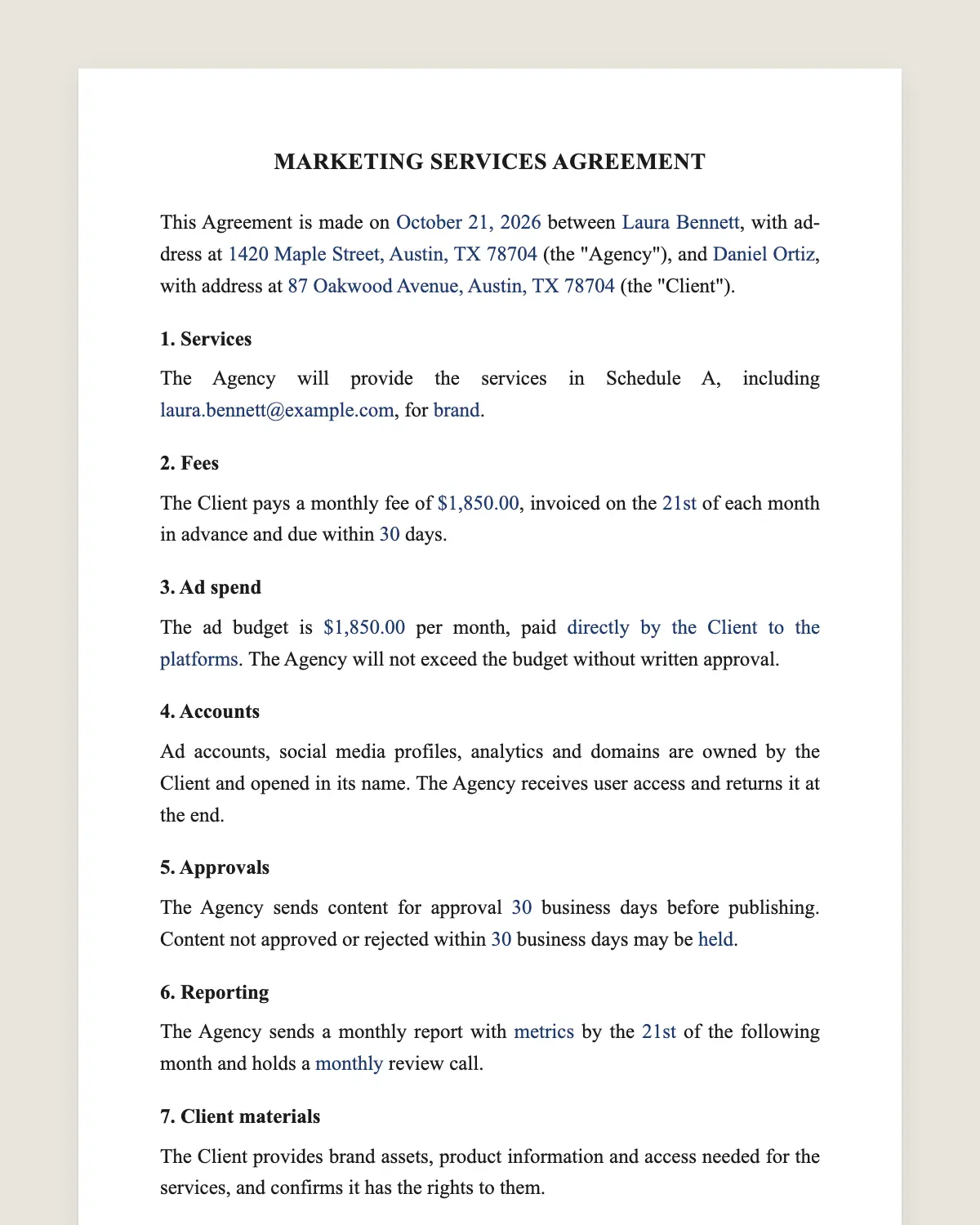
Example filled in with sample data
The full marketing services agreement
MARKETING SERVICES AGREEMENT
This Agreement is made on [date] between [Agency legal name], with address at [address] (the "Agency"), and [Client legal name], with address at [address] (the "Client").
1. Services
The Agency will provide the services in Schedule A, including [social media management, paid ads on [platforms], SEO, email marketing, content creation], for [brand or product].
2. Fees
The Client pays a monthly fee of [amount], invoiced on the [day] of each month in advance and due within [number] days.
3. Ad spend
The ad budget is [amount] per month, paid [directly by the Client to the platforms / through the Agency with a management fee of [percentage]]. The Agency will not exceed the budget without written approval.
4. Accounts
Ad accounts, social media profiles, analytics and domains are owned by the Client and opened in its name. The Agency receives user access and returns it at the end.
5. Approvals
The Agency sends content for approval [number] business days before publishing. Content not approved or rejected within [number] business days may be [held / published].
6. Reporting
The Agency sends a monthly report with [metrics] by the [day] of the following month and holds a [monthly] review call.
7. Client materials
The Client provides brand assets, product information and access needed for the services, and confirms it has the rights to them.
8. Ownership of work
On payment, the Client owns the content created for it under this Agreement. The Agency keeps its templates, methods and tools, and may show the work in its portfolio.
9. No guaranteed results
The Agency will perform the services with professional care. Specific results, rankings or sales are not guaranteed.
10. Term and termination
This Agreement starts on [date] and continues month to month after an initial term of [number] months. Either party may end it with [number] days of written notice.
11. Governing law and signature
This Agreement is governed by the laws of [state]. The parties agree to sign it electronically, with the same effect as a handwritten signature.
Schedule A. Services and deliverables per month.
Agency
Name and title: ______________
Date: ______________
Client
Name and title: ______________
Date: ______________
What the template includes
Services and deliverables in a schedule
Monthly fee and invoicing
Ad budget and how it is paid
Accounts owned by the client
Approval of content before publishing
Monthly reports and review calls
Client materials and rights
Ownership of the work created
No guarantee of specific results
Term, notice, governing law and electronic signature
What you fill in
Field
Example
Agency
North Star Growth LLC
Client
Cedar & Sage Home Goods
Services
Paid social, email marketing, 12 posts per month
Monthly fee
USD 3,500
Ad spend
USD 6,000 per month, paid by the client
Initial term
3 months
Notice to end
30 days
How it gets signed
1Choose «Use this template», fill in the fields and review the full marketing services agreement.
2Send it by WhatsApp or email. The other party opens the link on their phone without an account.
3They tap the brown bar at the bottom that says «Sign as …» and draw their signature once.
4Everyone gets the signed PDF with its signature certificate. Anyone can check it at signsolu.com/verificar.
The signing screen tells each signer that signing means agreeing to sign electronically. It links to the electronic signature disclosure that the ESIGN Act asks for.
What you get once everyone signs
The signed PDF. The final marketing services agreement with every drawn signature in place.
The signature certificate. It lists each signer and the date and time of each signature.
A record you can check. The folio on the certificate opens the document history at signsolu.com/verificar.
Reminders. Turn them on and SignSolú reminds every signer who has not signed yet.
Your first ten documents are free and need no card.
What the law says
A marketing services agreement is a contract under state law. Advertising itself must follow consumer protection rules, including truthful claims and clear disclosure of endorsements.
Email and text campaigns follow their own federal and state rules on consent and opt-out. Clause 1 should name the channels so both sides know which rules apply.
The ESIGN Act, 15 U.S.C. 7001 gives an electronic signature the same legal effect as one on paper. A contract cannot be denied effect only because it was signed electronically.
Who owns the ad accounts
When an agency opens ad accounts in its own name, the client can lose years of data at the end. Clause 4 keeps every account in the client's name.
The agency works with user access. When the relationship ends, the client removes that access and keeps everything.
Ad spend and management fees
Paying platforms directly keeps the money flow simple. The agency's fee stays separate and visible.
Some agencies pay platforms and bill the client with a management fee. If you choose that, write the percentage and how invoices show it.
Approvals without slowing down
Content calendars move fast. Clause 5 sets the approval window and what happens if the client does not answer.
Send each month's calendar through SignSolú as a one-page approval. The client signs from their phone and posts go out on time.
Example of a monthly retainer
A home goods brand hires an agency for paid social and email at USD 3,500 a month. The brand pays USD 6,000 of ad spend directly to the platforms.
The agency sends twelve posts for approval each month and a report by the 5th. After three months, the deal continues month to month with thirty days of notice.
Common mistakes
Promising results. Clause 9 promises professional work, not rankings.
Accounts in the agency's name. Open them in the client's name from the start.
No budget cap. Write the ad budget and the approval needed to go over it.
Setting goals together
Agree on two or three measures that matter to the client, such as qualified leads, cost per sale or email revenue.
Write them in Schedule A as goals, not guarantees. The monthly report tracks them and the review call discusses what to change.
Clear goals keep the relationship focused on results the client values, not on vanity numbers.
Onboarding a new client
Send the agreement with the onboarding form and the access checklist. The client signs and fills in the form from one link.
Access arrives faster, and the first campaign can start in days instead of weeks.
Keep the signed agreement and every approval in one folder for the account.
When the agreement ends, the client already owns every account and every piece of content, so the handover takes a day.