Photo release form template: free in Word, or sign it online
Reviewed in October 2026
A photo release form is a signed permission that lets a photographer or organization use a person’s image. It says where the photos may appear, for how long and whether the person is paid. Businesses, schools, event organizers and photographers use it.
Ten documents free, no card. Signed by the person photographed and a parent or guardian for minors.
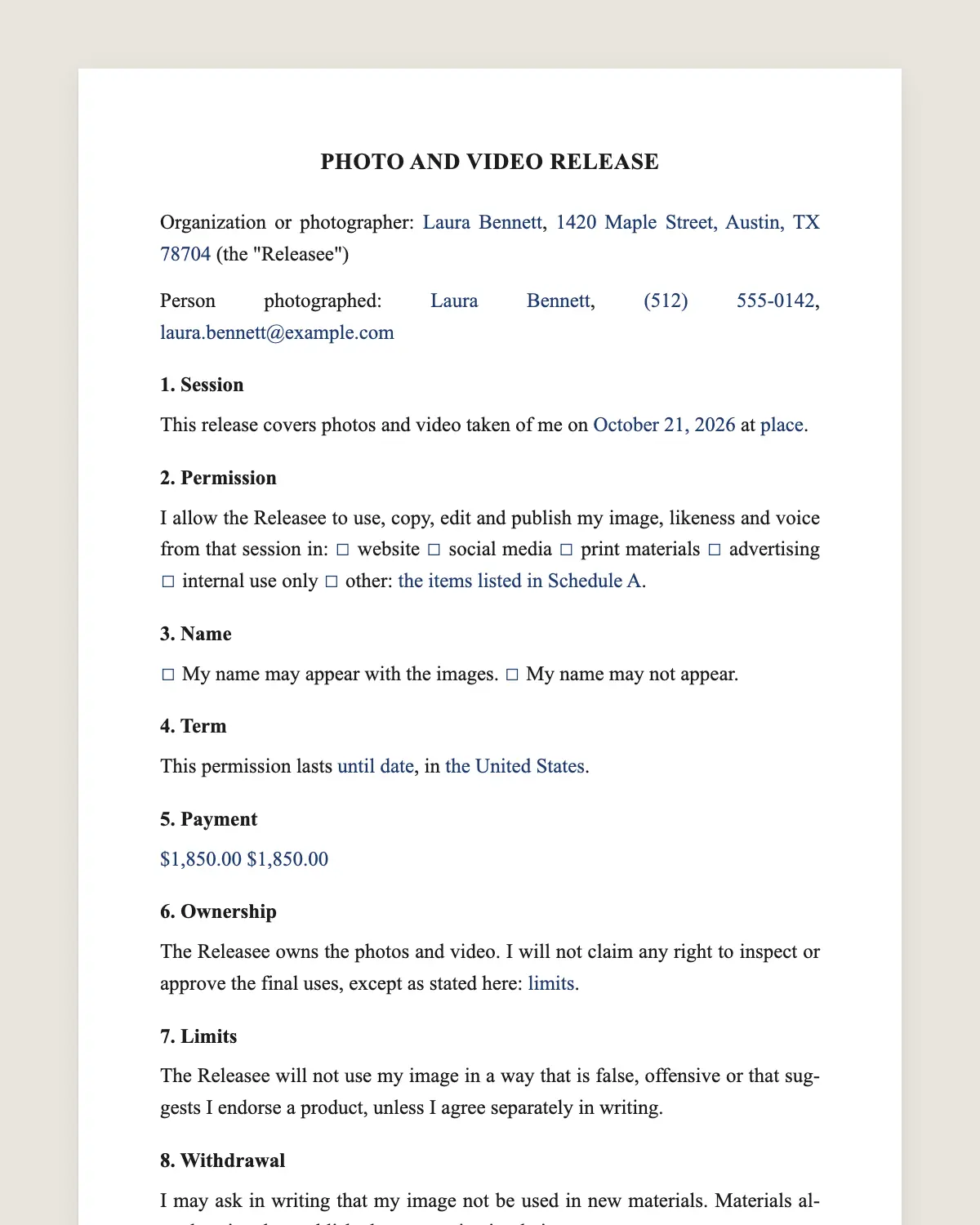
Example filled in with sample data
The full photo release form
PHOTO AND VIDEO RELEASE
Organization or photographer: [name], [address] (the "Releasee")
Person photographed: [full name], [phone], [email]
1. Session
This release covers photos and video taken of me on [date] at [place or event].
2. Permission
I allow the Releasee to use, copy, edit and publish my image, likeness and voice from that session in: [ ] website [ ] social media [ ] print materials [ ] advertising [ ] internal use only [ ] other: [describe].
3. Name
[ ] My name may appear with the images. [ ] My name may not appear.
4. Term
This permission lasts [until date / without time limit], in [the United States / worldwide].
5. Payment
[I receive no payment for this release.] [I receive amount, which I acknowledge.]
6. Ownership
The Releasee owns the photos and video. I will not claim any right to inspect or approve the final uses, except as stated here: [limits].
7. Limits
The Releasee will not use my image in a way that is false, offensive or that suggests I endorse a product, unless I agree separately in writing.
8. Withdrawal
I may ask in writing that my image not be used in new materials. Materials already printed or published may stay in circulation.
I have read this release and sign it voluntarily.
PERSON PHOTOGRAPHED
Signature: ______________________
Name: [full name]
Date: [date]
PARENT OR GUARDIAN (IF UNDER 18)
I am the parent or legal guardian and agree to this release for the minor.
Signature: ______________________
Name: [full name]
Date: [date]
What the template includes
Who takes the photos and who appears in them
Which session or event is covered
Where the images may be used, box by box
Whether the name appears
Duration and territory
Paid or unpaid
Ownership of the photos
Limits on false or offensive use
How to stop future use
Parent block for minors
What you fill in
Field
Example
Releasee
Oak Hill Bakery LLC
Person photographed
Daniela Ruiz
Session
October 25, 2026, bakery storefront
Uses
Website, social media and print menus
Name
May not appear
Term
Three years, United States
Payment
A 100 USD gift card
How it gets signed
1Choose “Use this template”, fill in the fields and read the full photo release form once more.
2Send it by WhatsApp or email. The other party opens the link on their phone without an account.
3They tap the brown bar at the bottom that says “Sign as …” and draw their signature with a finger.
4Everyone gets the signed PDF with its signature certificate. Anyone can check it at signsolu.com/verificar.
Before signing, each signer agrees to sign electronically. The screen links to the electronic signature disclosure the ESIGN Act asks for.
Your first ten documents are free and need no card.
Most states protect a person’s right of publicity, meaning control over commercial use of their name and likeness. A signed release shows the person agreed to the uses listed.
Minors cannot give this permission alone. A parent or legal guardian signs for them. Schools and youth groups usually collect releases at the start of the year.
The ESIGN Act gives electronic signatures on a release the same effect as ink.
When you need a photo release
Using customer or staff photos in ads or on your website.
Publishing event photos where people are clearly identifiable.
Selling stock photos that show recognizable people.
School, club or team photos shared outside the group.
News reporting and photos of crowds in public places follow different rules. When in doubt for marketing, ask for a release.
Choose the uses carefully
Ask only for the uses you plan. People sign more easily when they see exactly where their photo will go. You can always ask for a new release later.
Collecting releases at an event
Send the release with the registration link. Guests sign from their phones before they arrive. At the event, the photographer can check who signed and who opted out.
A worked example
Oak Hill Bakery invites a regular customer to pose for its new menu. She agrees to website, social and print uses for three years, without her name.
She signs from her phone before the shoot and receives a gift card. The bakery keeps the signed release with the photo files.
Mistakes to avoid
Using photos for ads when the release says internal use. Stick to the boxes checked.
No parent signature for a minor. The release is not valid without it.
Losing the release. Keep it with the photo files.
Releases for staff and customers
Employers often ask staff to sign a release for team photos and marketing. Make it a separate choice from the job, and let staff say no.
For customers, offer a small thank you, such as a discount or a gift card. Record it in clause 5.
Photographers and models
Freelance photographers use releases to sell or license their work. Commercial stock sites usually ask for a release for each recognizable person in the image.
Checklist before the shoot
1Uses chosen box by box.
2Name shown or not.
3Term and territory set.
4Payment written, even if zero.
5Parent block signed for minors.
Bring the list of who signed to the shoot and point the camera only at those who agreed.
Sample use choices
Website only: for a team page or a testimonial.
Social media: for posts on the business’s own accounts.
Print: menus, brochures, posters and flyers.
Advertising: paid ads online or in print.
Tick only the boxes you need now. Ask again if a new use comes up.
Tags and names online
Tagging a person on social media links the photo to their profile. Ask before you tag, and respect the name choice in clause 3.
When someone asks you to remove a photo
Stop using it in new posts and materials. Remove it from your own website and accounts if you can. Clause 8 explains what may stay, such as menus already printed.
Releases for schools and youth groups
Schools often collect one release per student each year. List the uses, such as the yearbook, the school website and local news. Parents choose box by box and sign from their phones.
Keep a list of students whose parents said no, and share it with anyone who takes photos at school events.
A filled-in sample
“I allow Oak Hill Bakery to use photos taken of me on October 25, 2026, on its website, social media and printed menus for three years in the United States, without my name. I received a 100 USD gift card.”
Then sign and send it before the shoot.
Keep the signed release with the final photos. If a question comes up years later, the release shows exactly what the person agreed to.
Yes. The ESIGN Act gives an electronic signature the same legal effect as a handwritten one. The signed PDF and its certificate show who signed the photo release, when and from which device.
Does the person in the photo need a SignSolú account to sign?
No. They open the link on their phone and sign with the brown bar at the bottom of the screen.
Can I download the photo release form in Word?
Yes. “Download in Word” gives you the full photo release form with no email and no account. You can print it or edit it and sign it here later.
Do I need a release for photos in public?
For news or art, often not. For advertising with a recognizable person, a release is the safe choice.
Can someone take back a photo release?
They can ask you to stop new uses. Clause 8 lets materials already published stay in circulation.
Does the release cover video too?
Yes. This template covers photos, video and voice from the session.
Does every person in a group photo need a release?
For advertising, every recognizable person should sign. For internal use or news, the rules are looser.
Should I pay people for a photo release?
You do not have to. Many releases are unpaid. If you pay, write the amount in clause 5.