Contract template: free in Word, or sign it online
Reviewed in October 2026
A contract template is a ready agreement between two parties that you adapt to a deal. It states who promises what, the price, the dates and what happens if someone fails. This general agreement fits most simple business deals and is signed online.
Ten documents free, no card. Signed by both parties.
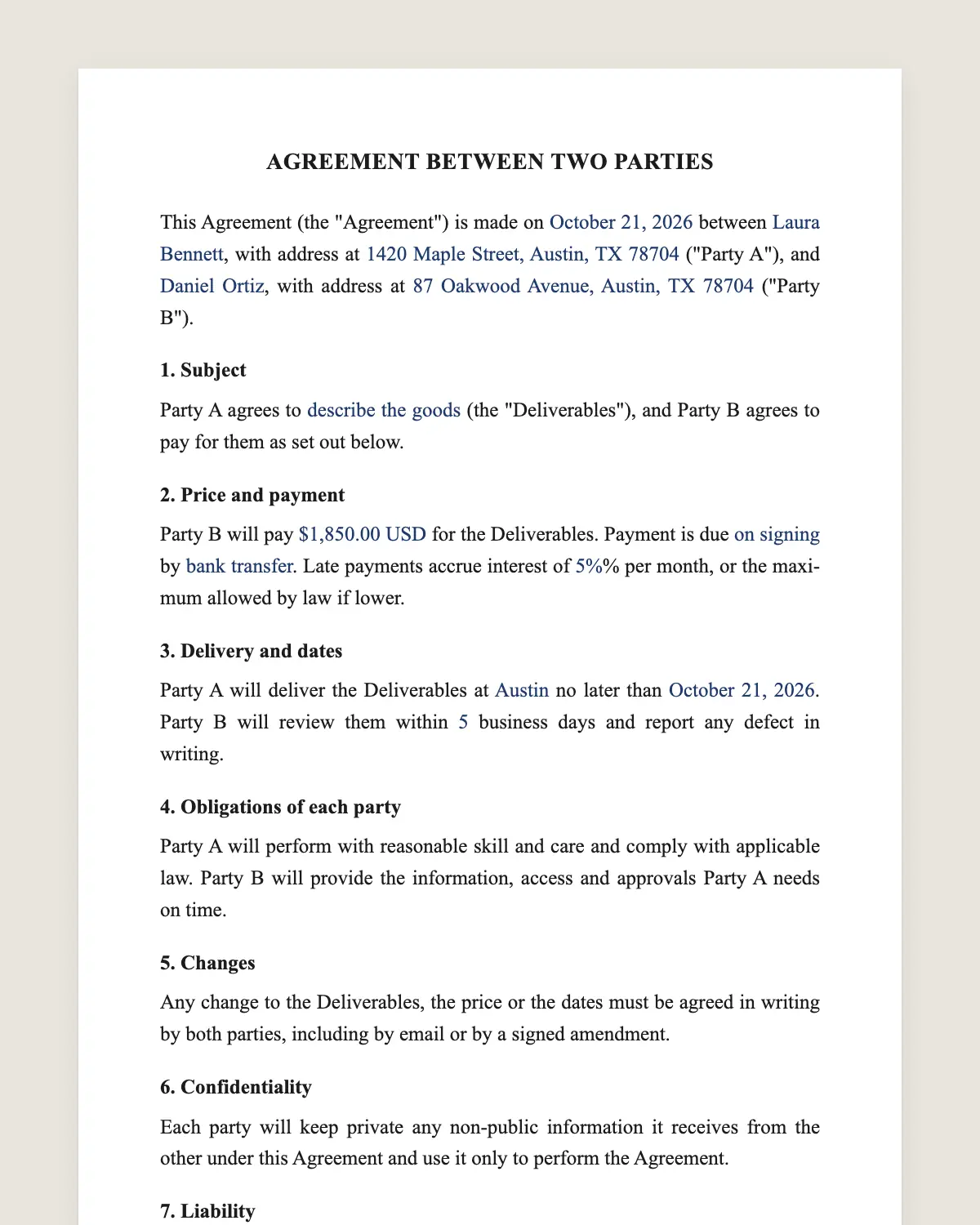
Example filled in with sample data
The full contract
AGREEMENT BETWEEN TWO PARTIES
This Agreement (the "Agreement") is made on [date] between [Party A name], with address at [address] ("Party A"), and [Party B name], with address at [address] ("Party B").
1. Subject
Party A agrees to [describe the goods, work or service] (the "Deliverables"), and Party B agrees to pay for them as set out below.
2. Price and payment
Party B will pay [amount] [currency] for the Deliverables. Payment is due [on signing / on delivery / in installments of amount on dates] by [bank transfer, card or check]. Late payments accrue interest of [rate]% per month, or the maximum allowed by law if lower.
3. Delivery and dates
Party A will deliver the Deliverables at [place] no later than [date]. Party B will review them within [5] business days and report any defect in writing.
4. Obligations of each party
Party A will perform with reasonable skill and care and comply with applicable law. Party B will provide the information, access and approvals Party A needs on time.
5. Changes
Any change to the Deliverables, the price or the dates must be agreed in writing by both parties, including by email or by a signed amendment.
6. Confidentiality
Each party will keep private any non-public information it receives from the other under this Agreement and use it only to perform the Agreement.
7. Liability
Neither party is liable for indirect or consequential damages. Each party’s total liability under this Agreement is limited to the amount paid or payable under it, except for fraud or willful misconduct.
8. Termination
Either party may end this Agreement by written notice if the other party breaches it and does not fix the breach within [10] days after notice. Party B will pay for Deliverables received before termination.
9. Disputes
The parties will first try to resolve any dispute in good faith. If they cannot within [30] days, either party may go to the courts of [county and state].
10. General terms
This Agreement is governed by the laws of [state]. It is the entire agreement between the parties on its subject. If a clause is unenforceable, the rest stays in force. The parties agree to sign electronically, with the same effect as a handwritten signature.
PARTY A
Signature: ______________________
Name: [full name]
Date: [date]
PARTY B
Signature: ______________________
Name: [full name]
Date: [date]
What the template includes
What one party delivers and the other pays for
Price, payment method and late interest
Delivery date, place and review period
Basic duties of each party
Changes only in writing
Confidentiality of what each side learns
A cap on liability
Termination for breach with time to fix it
Good-faith talks before going to court
Governing law and consent to sign electronically
What you fill in
Field
Example
Date
October 21, 2026
Party A
Lopez Woodworks LLC
Party B
Greenline Cafe, Inc.
Deliverables
Six custom oak tables for the dining room
Price
4,800 USD, half on signing and half on delivery
Delivery date
November 30, 2026
Days to fix a breach
10 days
Courts and governing law
Travis County, Texas
How it gets signed
1Choose “Use this template”, fill in the fields and read the full contract once more.
2Send it by WhatsApp or email. The other party opens the link on their phone without an account.
3They tap the brown bar at the bottom that says “Sign as …” and draw their signature with a finger.
4Everyone gets the signed PDF with its signature certificate. Anyone can check it at signsolu.com/verificar.
Before signing, each signer agrees to sign electronically. The screen links to the electronic signature disclosure the ESIGN Act asks for.
Your first ten documents are free and need no card.
A contract is a private contract. State contract law decides whether it holds. Courts look for an offer, an acceptance, something of value on each side and terms clear enough to enforce.
The ESIGN Act says a contract cannot be denied legal effect only because it was signed electronically. Most states also follow the Uniform Electronic Transactions Act. Both parties can sign from their phones and keep the signed PDF as the original.
A few documents fall outside the ESIGN Act, such as wills and court orders. The list is in section 7003. A business agreement like this one is not on it.
When a general contract is enough
Use this template for one-off deals between two parties. A furniture order, a small renovation, a catering job or a one-time design project fit well.
Choose a specific template when the deal has its own rules. Leases, loans, employment and vehicle sales carry legal points a general contract misses.
1Name the parties with their full legal names. For a company, use the name on its state registration.
2Describe what is delivered so a stranger could check it. Quantities, sizes and dates beat adjectives.
3Put the price in numbers and say when each payment is due.
4Say what happens when something goes wrong. Late payment, late delivery and defects all need an answer.
5Have both parties sign the same version and keep the signed copy.
Common mistakes in simple contracts
Signing a quote instead of a contract. A quote rarely says what happens if delivery fails.
No date for payment. “On completion” starts arguments about what completion means.
Changes by phone. Clause 5 asks for written changes. An email counts.
One signature only. Both parties should sign. A contract signed by one side is harder to enforce.
Signing with someone in another city
Distance is not a problem. You send the link by WhatsApp or email and the other party signs on their phone. The certificate records each signer, the time and the device.
Pick one state for the governing law and the courts. Choose the one where the work happens or where the client is.
Keeping the signed contract
The signed PDF is your original. Store it with the invoices and delivery notes of the same deal. If a dispute comes up, those three papers tell the whole story.
SignSolú keeps every signed document in your account with its certificate. The certificate shows who signed, the date, the time and the device. Anyone can check that the file was not changed at /verificar.
If the deal changes later, do not edit the signed file. Sign a short amendment that names the original contract and lists the change.
A worked example
Lopez Woodworks agrees to build six oak tables for Greenline Cafe. The price is 4,800 USD, half on signing and half on delivery. Delivery is due by November 30.
Clause 3 gives the cafe five business days to report defects. One table arrives with a cracked leg. The cafe reports it by email on day two, and the shop replaces the leg under clause 4.
The final payment is due on delivery. When it comes late, clause 2 adds interest. Nobody argues, because every rule is in the signed contract.
An offer, an acceptance, something of value given by each side, people with the capacity to sign and a lawful purpose. Writing it down and signing it, on paper or electronically, makes those terms easy to prove.
Is a contract signed online legally binding?
Yes. The ESIGN Act gives an electronic signature the same legal effect as a handwritten one. The signed PDF and its certificate show who signed the contract, when and from which device.
Does the other party need a SignSolú account to sign?
No. They open the link on their phone and sign with the brown bar at the bottom of the screen.
Can I download the contract in Word?
Yes. “Download in Word” gives you the full contract with no email and no account. You can print it or edit it and sign it here later.
Does a contract need a witness or a notary?
No, for most business contracts. Some documents, such as real estate deeds and certain powers of attorney, follow special rules.
Can I add clauses to the template?
Yes. After “Use this template” you can add, change or delete any clause before you send it.
How many contracts can I sign for free?
Your first ten documents are free and need no card.
What if the other party does not sign?
Nothing is binding until both sign. SignSolú shows you who has signed and lets you send a reminder.